Main story: Motivation → Visualization Update → Annotation Strategy → Functional Clustering.
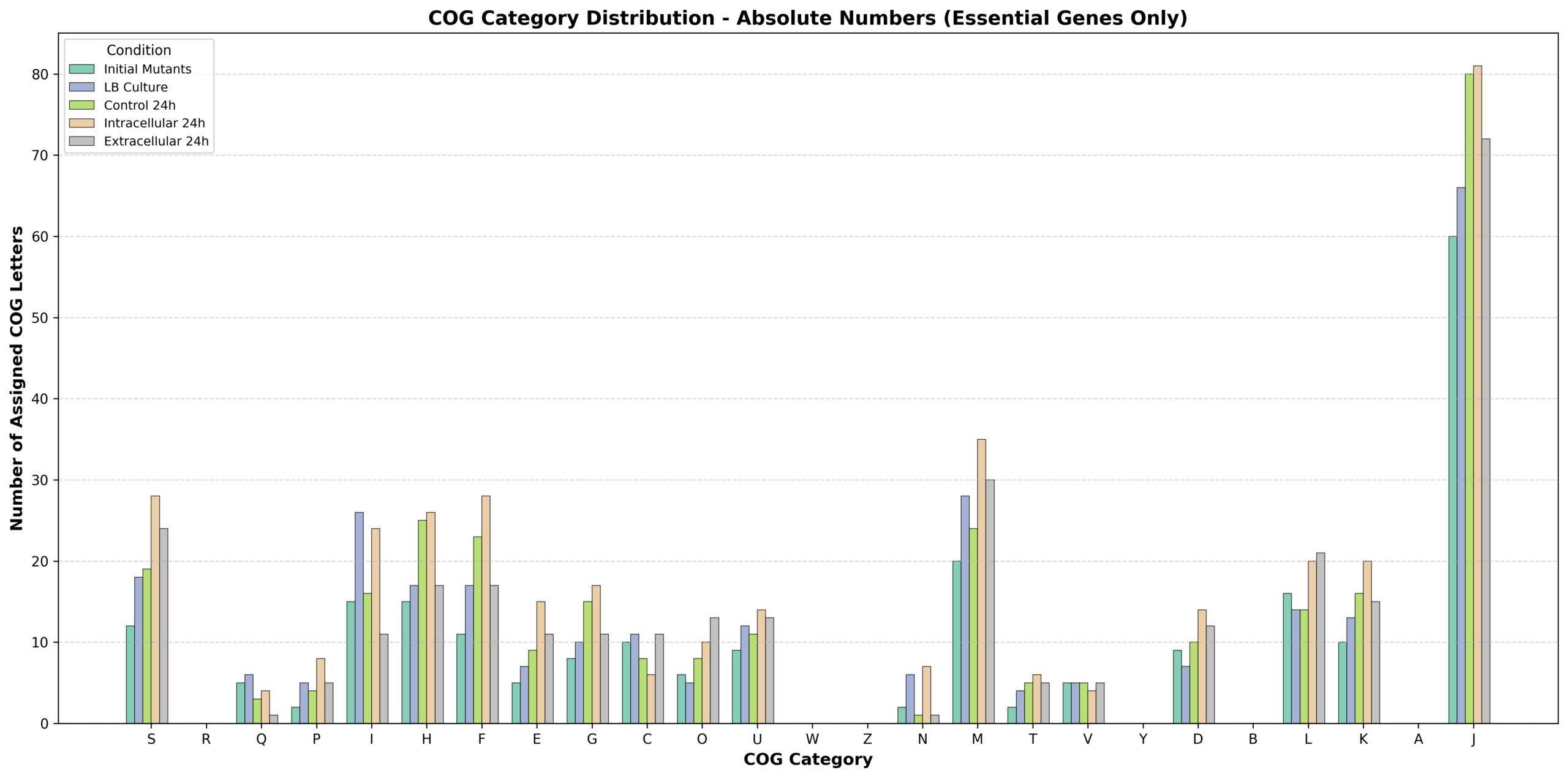
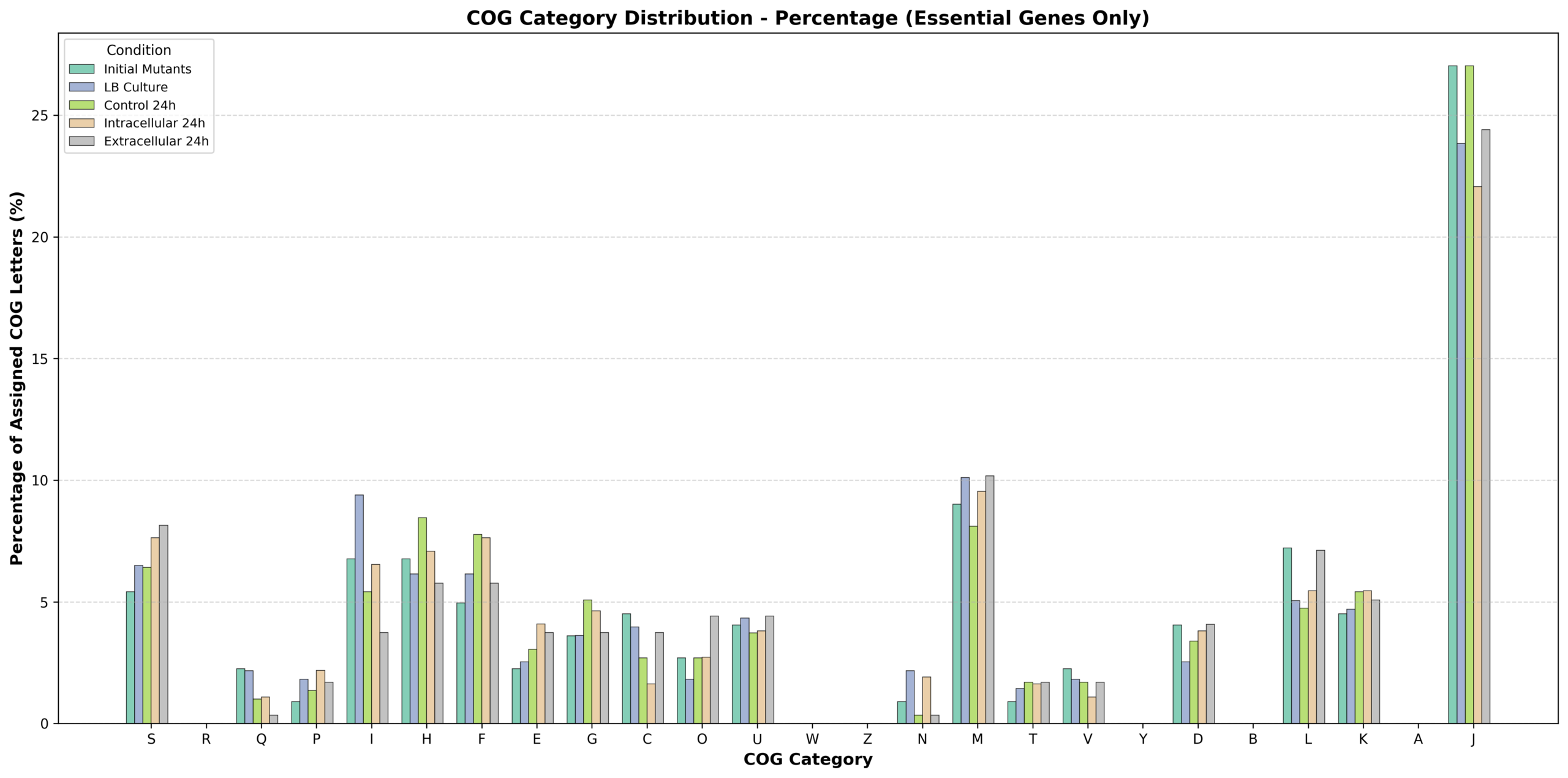
R、W、Z、Y、B、A 这些 COG 类别在所有条件下确实都显示为零或接近零。这与之前我解释的情况不同,让我为您解释为什么在您的实验数据中这些类别会是零:
可能的原因:
1. 技术/方法学原因
- Tn5 转座子饱和度的限制:某些必需基因可能因为序列特征(如 GC 含量、二级结构)而难以被 Tn5 转座子插入,导致这些基因在筛选中未被识别
- 基因注释的局限性:使用的 COG 数据库版本或注释工具可能没有将某些基因正确分类到这些类别
2. 生物学原因
Y (核结构) 和 B (染色质结构):
- 细菌没有真正的细胞核,这些类别在细菌中本来就很少见
- 细菌的染色体相关蛋白(如 HU、H-NS)可能被注释到了其他类别(如 L – 复制、重组和修复)
A (RNA 加工和修饰):
- 细菌的 RNA 加工机制相对简单
- 相关基因可能被归类到了其他类别(如 J – 翻译相关)
Z (细胞骨架):
- 虽然细菌有 FtsZ 等细胞骨架蛋白,但在某些菌株中这些基因可能不是绝对必需的
- 或者这些基因被注释到了其他类别(如 D – 细胞周期控制)
W (细胞外结构):
- 在实验室培养条件下,某些细胞外结构基因可能不是必需的
- 这些基因通常在特定环境(如感染、生物膜形成)中才变得重要
R (一般功能预测):
- 这个类别通常是”未知功能”的暂存区
- 如果您的基因组注释质量很高,大多数基因都有了明确的功能分类,R 类就会很少
3. 验证步骤
- 检查原始数据:查看是否真的有基因被注释到这些类别,但在筛选必需基因时被排除了
- 手动检查关键基因:例如 FtsZ(应该在 Z 类)、SMC 蛋白(可能在 Y 或 B 类)的实际注释情况
- 重新运行 COG 注释:使用最新的数据库(如 eggNOG-mapper)重新注释,看结果是否一致
Pipeline Update: Refining TraDIS Visualizations and Functionally Clustering Essential Genes in Non-Model Organisms
Context & Motivation: Following a review of our TraDIS data visualization, we received feedback to make two key updates for our upcoming manuscript:
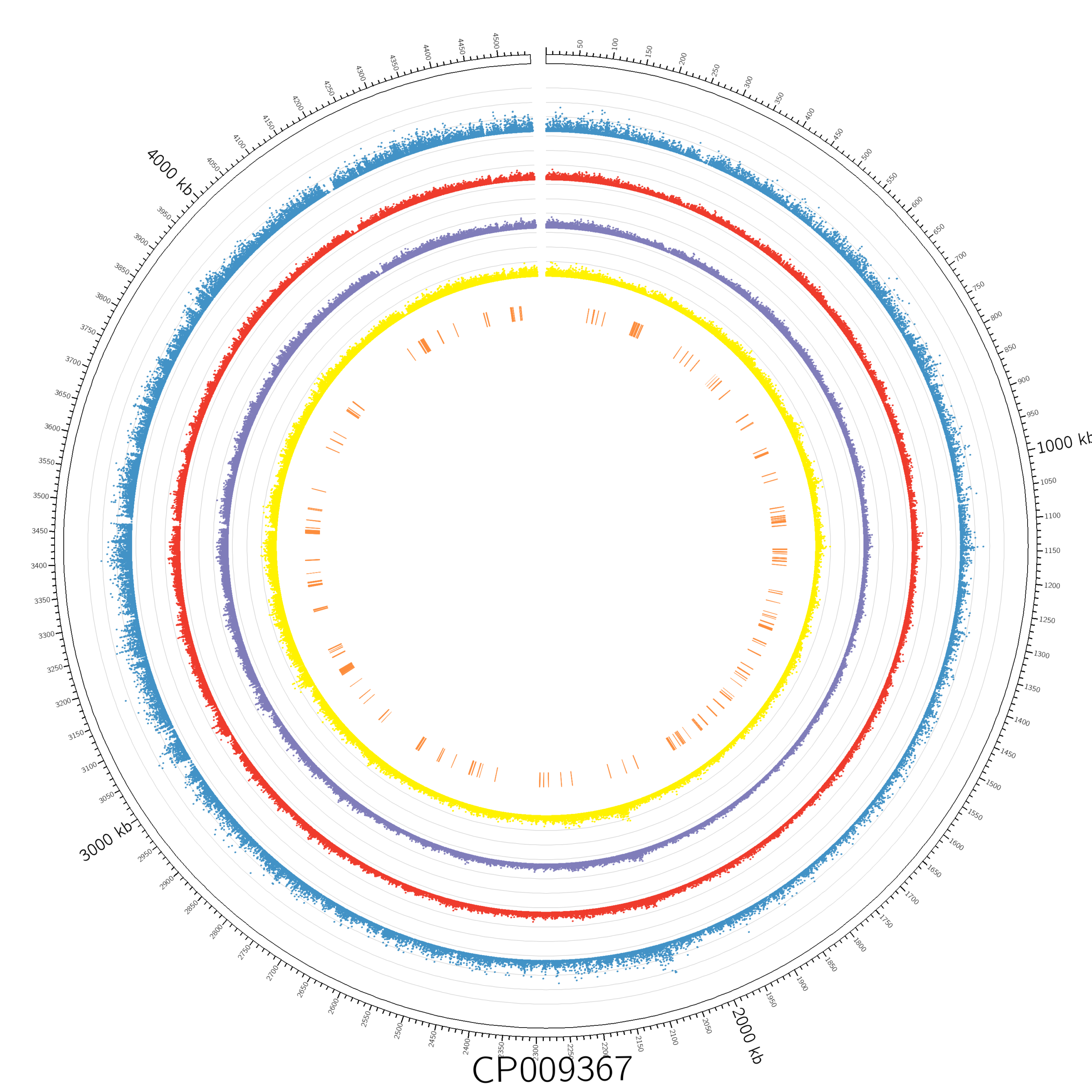
- Remove the extracellular bacteria sample (green outer ring) from the Circos plot to reduce visual clutter.
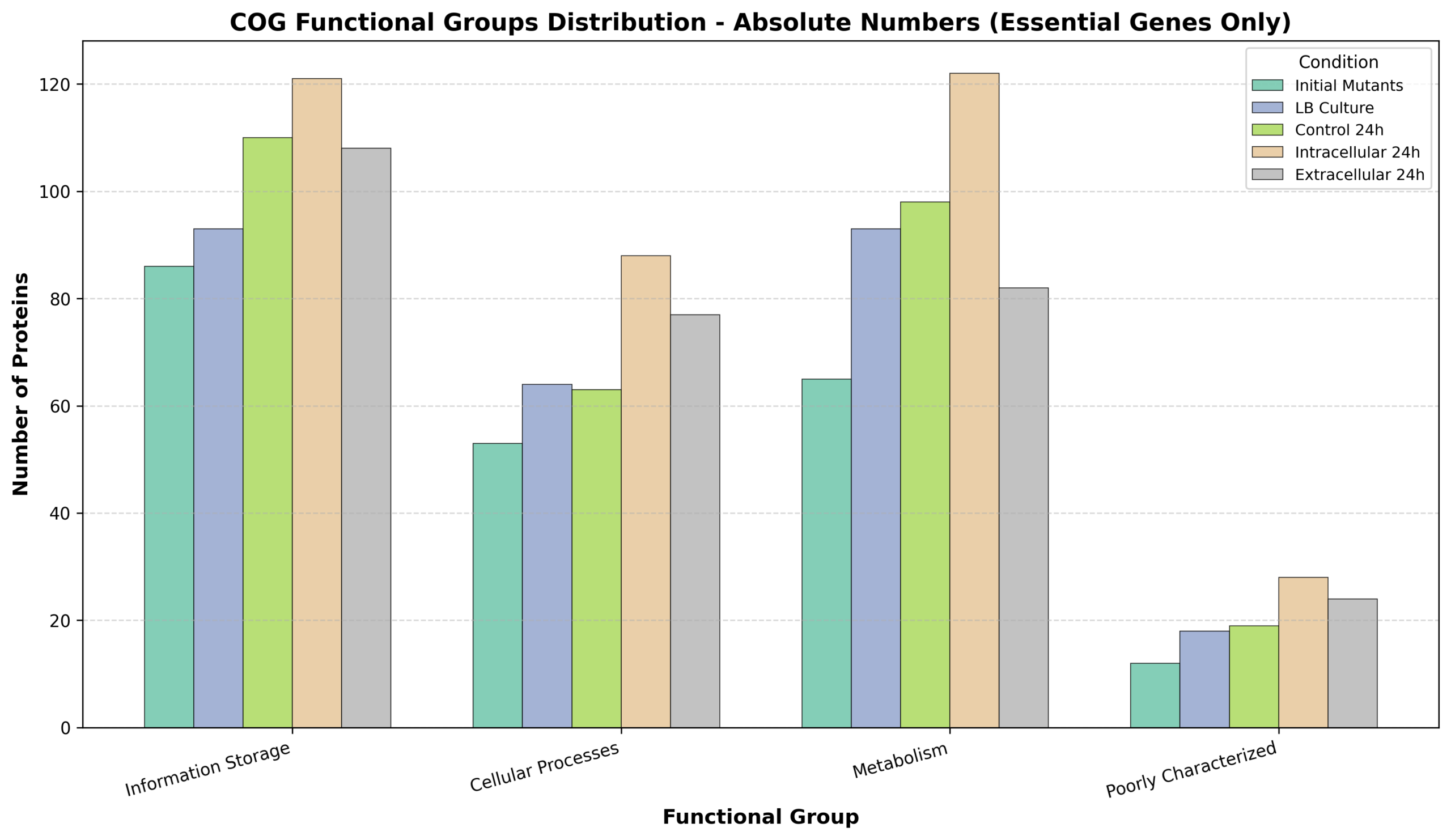
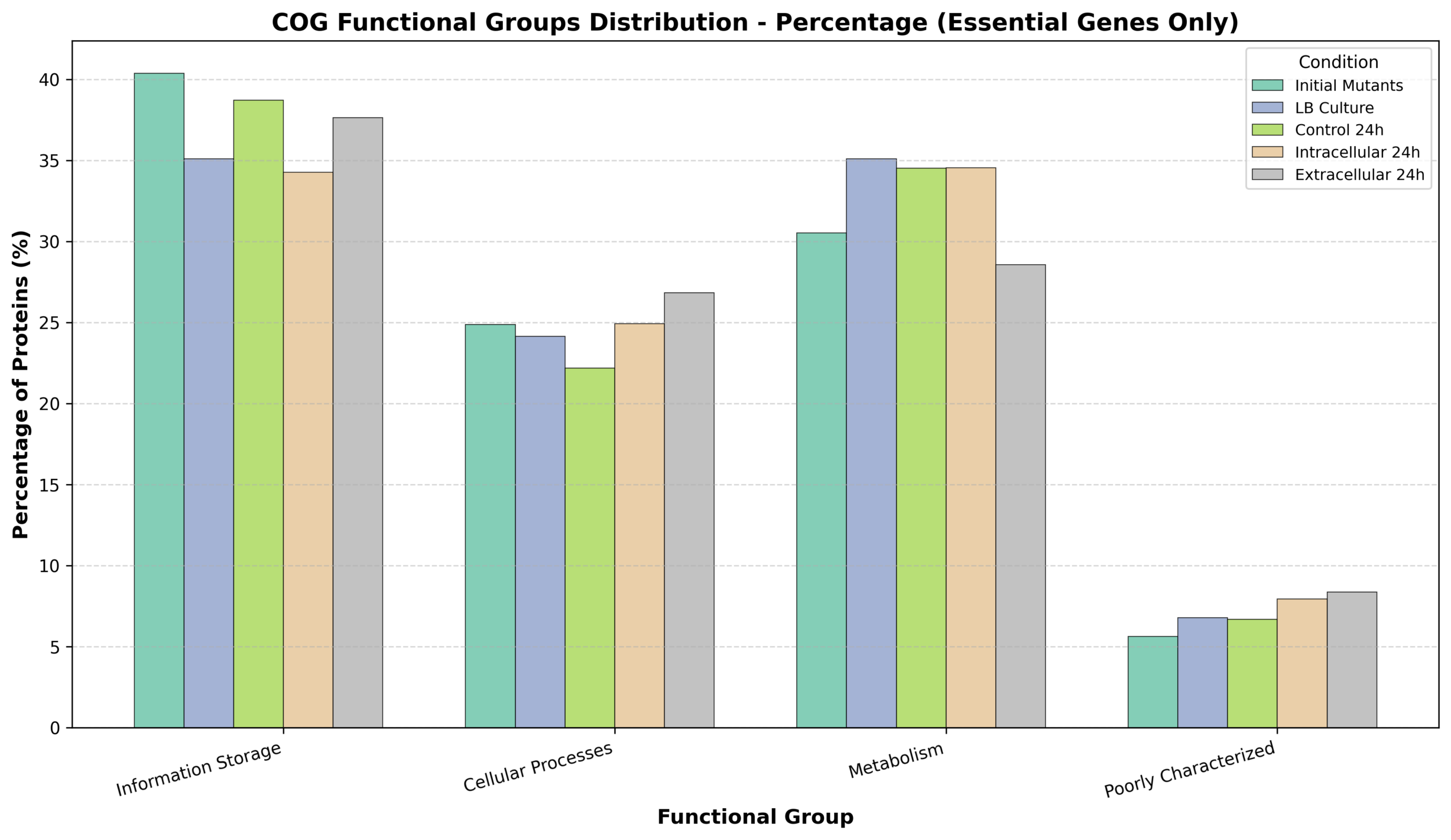
- Generate a comprehensive functional clustering table of all identified essential genes (e.g., ribosome-associated, DNA-associated) to replace vague references to “confirmed essential genes” in the methods section.
Below is the adapted pipeline to achieve both goals, specifically tailored for a non-model organism where standard R annotation packages (e.g., org.Hs.eg.db) do not apply. Instead, we derive functional annotations directly from protein sequences using EggNOG-mapper.
Part 1: Updating the Circos Visualization
To remove the extracellular sample, we must adjust the circos.conf file by removing its corresponding plot block and re-balancing the radii (r1 and r0) of the remaining rings. This ensures the 4 remaining conditions and the essential genes heatmap evenly distribute and fill the space left by the removed outer ring.
Action: Replace the plots section in your configuration file and run:
circos -conf circos_4rings.confPart 2: Functional Annotation Strategy (EggNOG-mapper)
Since standard organism-specific databases are unavailable, we use EggNOG-mapper to generate robust functional annotations (COG categories, KEGG pathways, GO terms) directly from the protein FASTA sequences.
2A) Environment Setup
mamba create -n eggnog_env python=3.8 eggnog-mapper -c conda-forge -c bioconda   # Installs eggnog-mapper 2.1.12
mamba activate eggnog_env
2B) Database Preparation
mkdir -p /home/jhuang/mambaforge/envs/eggnog_env/lib/python3.8/site-packages/data/
download_eggnog_data.py --dbname eggnog.db -y \
  --data_dir /home/jhuang/mambaforge/envs/eggnog_env/lib/python3.8/site-packages/data/
2C) Input Preparation & Execution
(Note: Step 2C.1 is optional and used primarily for RNA-seq integration baseline, but good practice for header standardization).
1. Clean Reference FASTA Headers (Optional):
mv ~/Downloads/sequence\(12\).txt CP009367_protein_.fasta
python ~/Scripts/update_fasta_header.py CP009367_protein_.fasta CP009367_protein.fasta- Input: Downloaded GenBank protein FASTA (
CP009367_protein_.fasta) - Output: Cleaned FASTA headers (
CP009367_protein.fasta)
2. Run EggNOG-mapper:
emapper.py -i CP009367_protein.fasta -o eggnog_out --cpu 60
# Add --resume if the process was interrupted- Output:
eggnog_out.emapper.annotations(Contains all functional mappings for downstream clustering).
Part 3: Essential Gene Functional Clustering & Reporting
To answer the request for a table showing all essential genes and their involved pathways, we cross-reference the TraDIS essentiality calls with the EggNOG annotations using a custom Python profiler.
3A) Execute the Clustering Pipeline
Run the adapted profiling script, which strictly filters for genes marked as "Essential" in the final column of the Tn5Gaps.xls sheets, maps them to their COG categories, and generates both summary statistics and manuscript-ready tables.
cd /mnt/md1/DATA/Data_Jiline_Transposon/
./tn5_essential_cog_profiler.py
3B) Finalize the Manuscript Excel Output
The script generates Tn5_Essential_COG_Summary.xlsx. Before sharing with collaborators or inserting into the manuscript supplementary materials, perform these final cleanup steps in Excel:
- Rename the primary sheet: Change the name of the main detailed sheet to
Essential_Genes_Functional_Groups. - Clean up the Summary sheet: In the final summary tab, delete the
UnassignedandR+S_Percentcolumns to keep the focus strictly on the assigned functional distributions.
Final Deliverables:
- Updated Circos plots (
.png/.svg) with 4 rings. Tn5_Essential_COG_Summary.xlsxcontaining the complete, filtered table of essential genes mapped to their specific COG letters and broader functional groups (Information Storage, Cellular Processes, Metabolism, etc.).