Monthly Archives: October 2025

Step‑by‑Step Workflow for Phylogenomic and Functional Analysis of 100 Clinical Isolates Using WGS Data

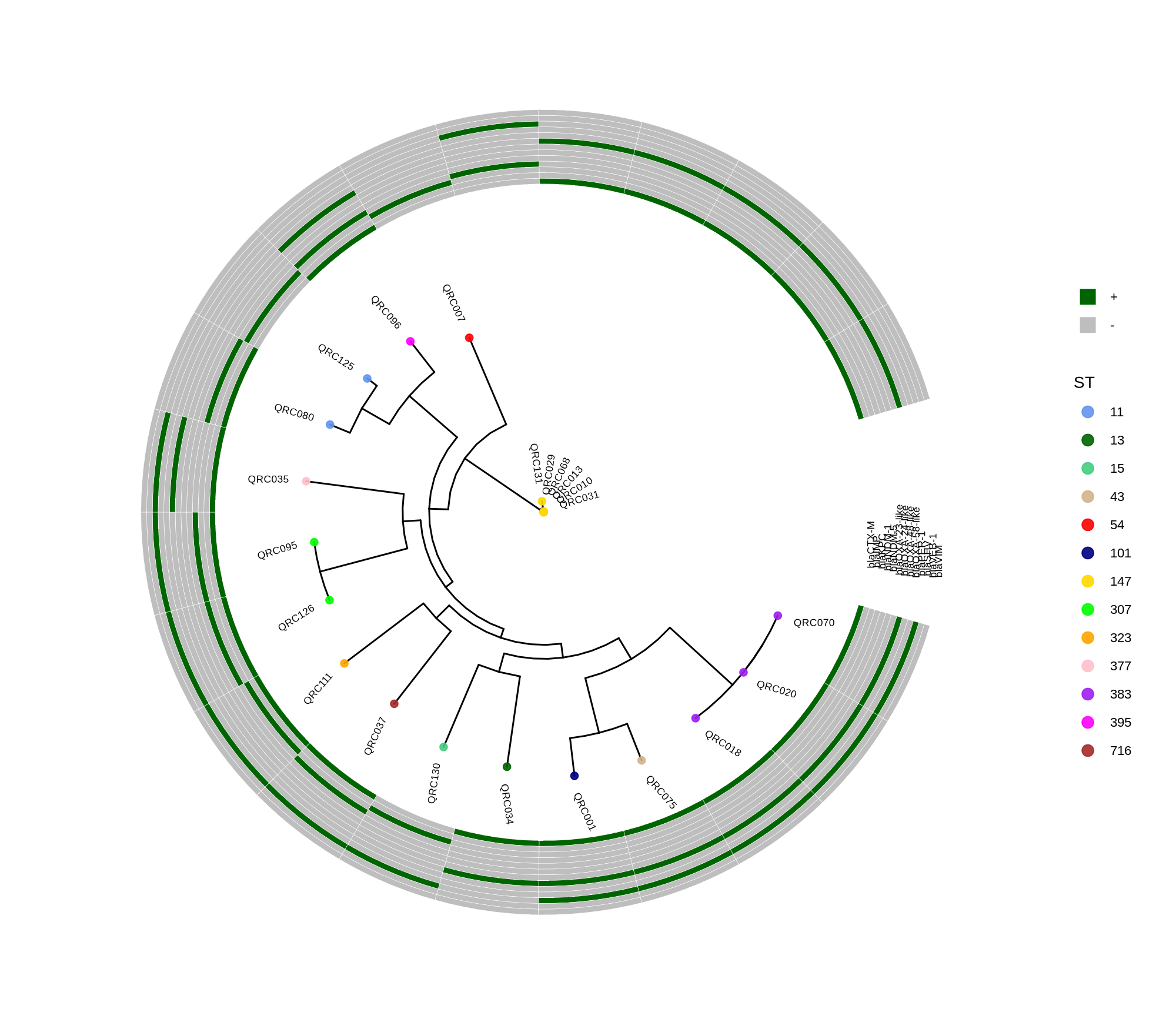
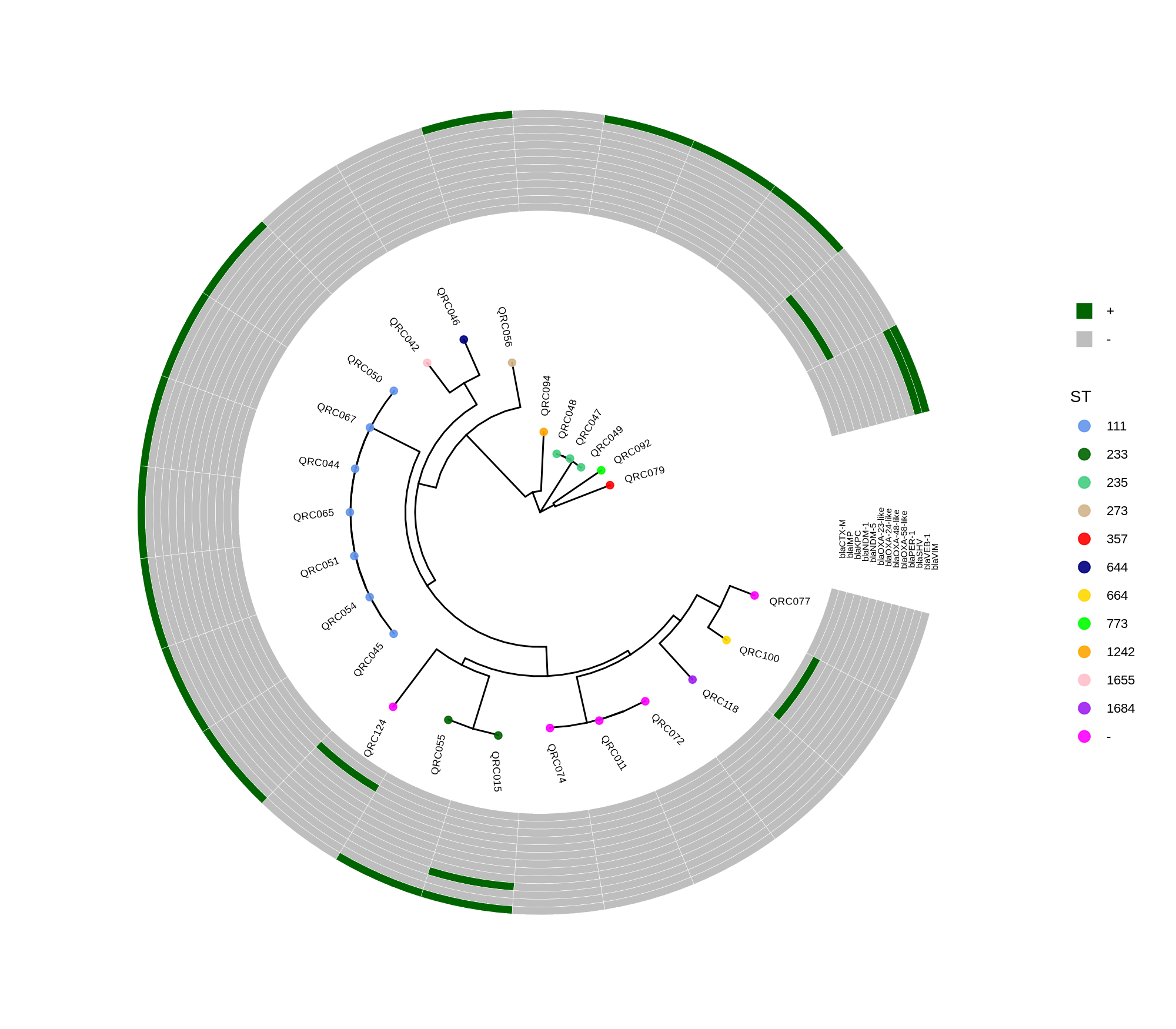
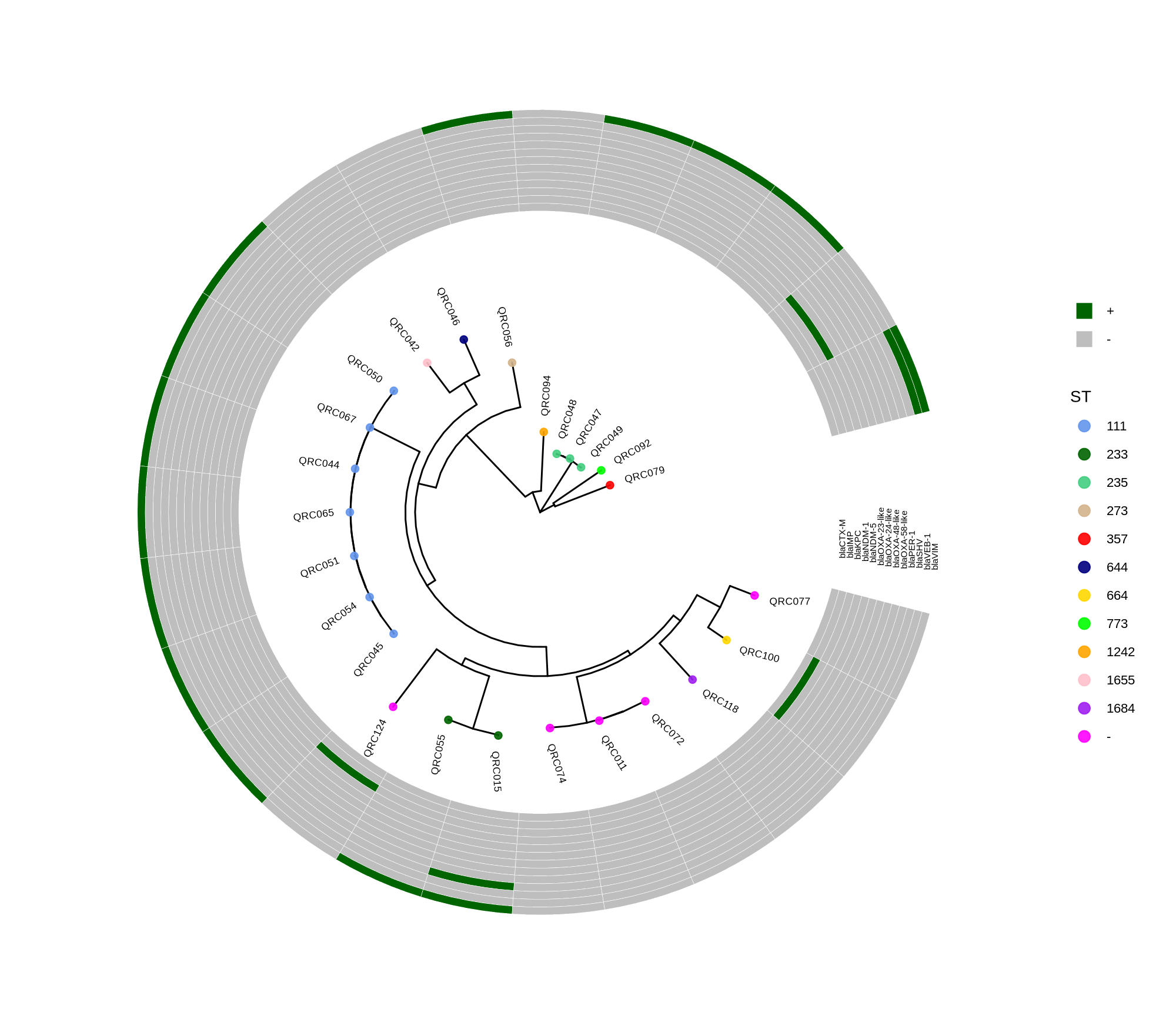
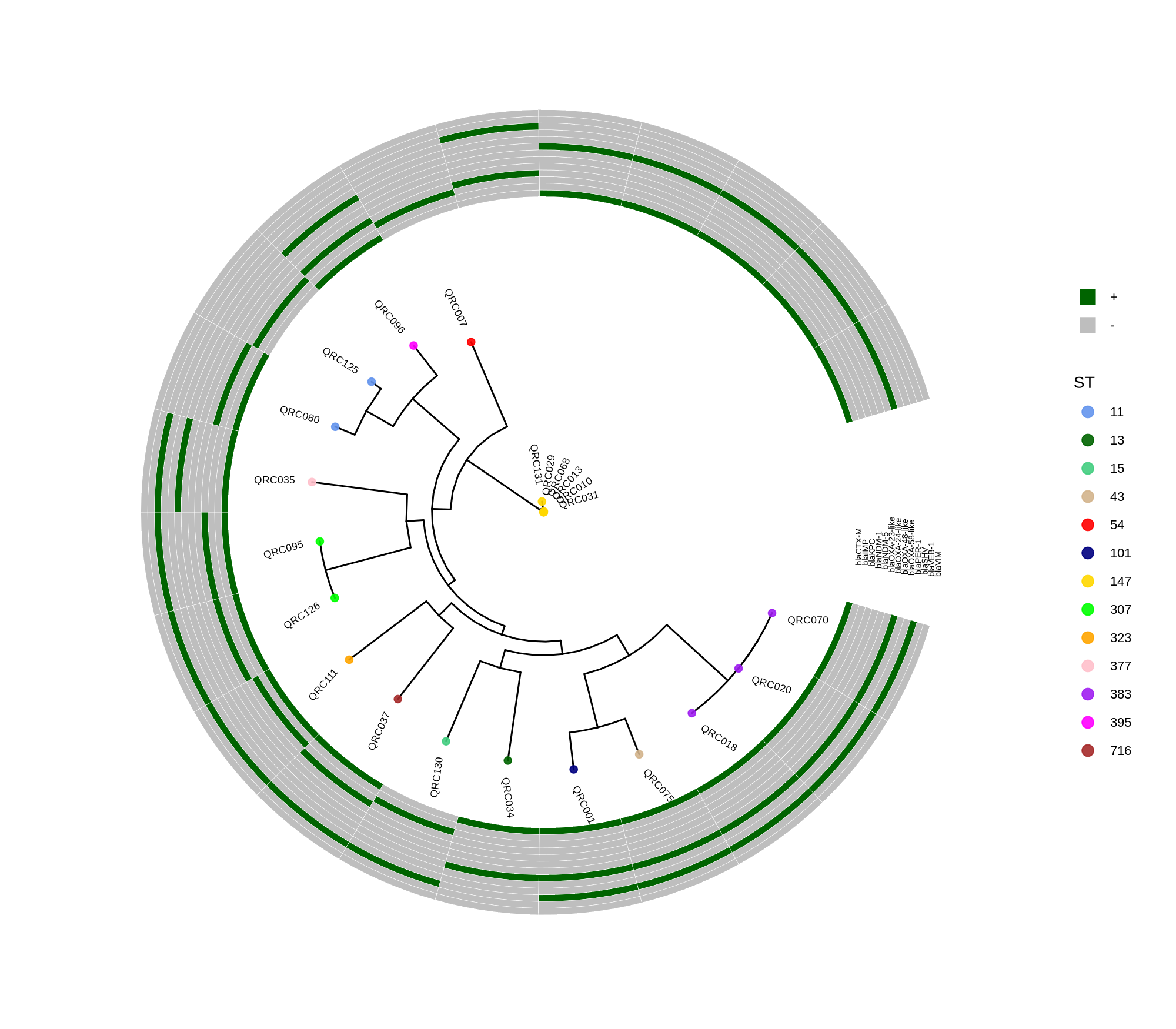
  • ggtree_and_gheatmap_kpneumoniae_new
  • ggtree_and_gheatmap_paeruginosa_new
  • ggtree_and_gheatmap_paeruginosa
  • ggtree_and_gheatmap_kpneumoniae
  • ggtree_and_gheatmap_abaumannii
  • ggtree_and_gheatmap_ecoli

Below is a sorted, step‑by‑step protocol integrating all commands and materials from your notes — organized into logical analysis phases. It outlines how to process whole‑genome data, annotate with Prokka, perform pan‑genome and SNP‑based phylogenetic analysis, and conduct resistome profiling and visualization.


1. Initial Setup and Environment Configuration

  1. Create and activate working environments:
conda create -n bengal3_ac3 python=3.9
conda activate /home/jhuang/miniconda3/envs/bengal3_ac3
  1. Copy necessary config files for bacto:
cp /home/jhuang/Tools/bacto/bacto-0.1.json .
cp /home/jhuang/Tools/bacto/Snakefile .
  1. Prepare R environment for later visualization:
mamba create -n r_414_bioc314 -c conda-forge -c bioconda \
  r-base=4.1.3 bioconductor-ggtree bioconductor-treeio \
  r-ggplot2 r-dplyr r-ape pandoc

2. Species Assignment and MLST Screening

  • Use WGS data to determine phylogenetic relationships based on MLST. Confirm species identity of isolates: E. coli, K. pneumoniae, A. baumannii complex, P. aeruginosa.
  • Example log output:
[10:19:59] Excluding ecoli.icdA.262 due to --exclude option
[10:19:59] If you like MLST, you're going to absolutely love cgMLST!
[10:19:59] Done.
  • Observation: No strain was close enough to be a suspected clonal strain (to be confirmed later with SNP‑based analysis).

3. Genome Annotation with Prokka

Cluster isolates into four species folders and annotate each genome separately.

Example shell script:

for cluster in abaumannii_2 ecoli_achtman_4 klebsiella paeruginosa; do
  GENUS_MAP=( [abaumannii_2]="Acinetobacter" [ecoli_achtman_4]="Escherichia" [klebsiella]="Klebsiella" [paeruginosa]="Pseudomonas" )
  SPECIES_MAP=( [abaumannii_2]="baumannii" [ecoli_achtman_4]="coli" [klebsiella]="pneumoniae" [paeruginosa]="aeruginosa" )
  prokka --force --outdir prokka/${cluster} --cpus 8 \
         --genus ${GENUS_MAP[$cluster]} --species ${SPECIES_MAP[$cluster]} \
         --addgenes --addmrna --prefix ${cluster} \
         -hmm /media/jhuang/Titisee/GAMOLA2/TIGRfam_db/TIGRFAMs_15.0_HMM.LIB
 done

4. Pan‑Genome Construction with Roary

Run Roary for each species cluster (GFF outputs from Prokka):

roary -f roary/ecoli_cluster -e --mafft -p 100 prokka/ecoli_cluster/*.gff
roary -f roary/kpneumoniae_cluster1 -e --mafft -p 100 prokka/kpneumoniae_cluster1/*.gff
roary -f roary/abaumannii_cluster -e --mafft -p 100 prokka/abaumannii_cluster/*.gff
roary -f roary/paeruginosa_cluster -e --mafft -p 100 prokka/paeruginosa_cluster/*.gff

Output: core gene alignments for each species.


5. Core‑Genome Phylogenetic Tree Building (RAxML‑NG)

Use maximum likelihood reconstruction per species:

raxml-ng --all --msa roary/ecoli_achtman_4/core_gene_alignment.aln --model GTR+G --bs-trees 1000 --threads 40 --prefix ecoli_core_gene_tree_1000
raxml-ng --all --msa roary/klebsiella/core_gene_alignment.aln --model GTR+G --bs-trees 1000 --threads 40 --prefix klebsiella_core_gene_tree_1000
raxml-ng --all --msa roary/abaumannii/core_gene_alignment.aln --model GTR+G --bs-trees 1000 --threads 40 --prefix abaumannii_core_gene_tree_1000
raxml-ng --all --msa roary/paeruginosa/core_gene_alignment.aln --model GTR+G --bs-trees 1000 --threads 40 --prefix paeruginosa_core_gene_tree_1000

6. SNP Detection and Distance Calculation

  1. Extract SNP sites and generate distance matrices:
snp-sites -v -o core_snps.vcf roary/ecoli_achtman_4/core_gene_alignment.aln
snp-dists roary/ecoli_achtman_4/core_gene_alignment.aln > ecoli_snp_dist.tsv
  1. Repeat for other species and convert to Excel summary:
~/Tools/csv2xls-0.4/csv_to_xls.py ecoli_snp_dist.tsv klebsiella_snp_dist.tsv abaumannii_snp_dist.tsv paeruginosa_snp_dist.tsv -d$'\t' -o snp_dist.xls

7. Resistome and Virulence Profiling with Abricate

  1. Install and set up databases:
conda install -c bioconda -c conda-forge abricate=1.0.1
abricate --setupdb
abricate --list
DATABASE        SEQUENCES       DBTYPE  DATE
vfdb    2597    nucl    2025-Oct-22
resfinder       3077    nucl    2025-Oct-22
argannot        2223    nucl    2025-Oct-22
ecoh    597     nucl    2025-Oct-22
megares 6635    nucl    2025-Oct-22
card    2631    nucl    2025-Oct-22
ecoli_vf        2701    nucl    2025-Oct-22
plasmidfinder   460     nucl    2025-Oct-22
ncbi    5386    nucl    2025-Oct-22
  1. Run VFDB for virulence genes:
# # Run VFDB example
# abricate --db vfdb genome.fasta > vfdb.tsv
#
# # strict filter (≥90% ID, ≥80% cov) using header-safe awk
# awk -F'\t' 'NR==1{
#   for(i=1;i<=NF;i++){if($i=="%IDENTITY") id=i; if($i=="%COVERAGE") cov=i}
#   print; next
# } ($id+0)>=90 && ($cov+0)>=80' vfdb.tsv > vfdb.strict.tsv

# 0) Define your cluster directories (exactly as in your prompt)
CLUSTERS="fasta_abaumannii_cluster fasta_kpnaumoniae_cluster1 fasta_kpnaumoniae_cluster2 fasta_kpnaumoniae_cluster3"

# 1) Run Abricate (VFDB) per isolate, strictly filtered (≥90% ID, ≥80% COV)
for D in $CLUSTERS; do
  mkdir -p "$D/abricate_vfdb"
  for F in "$D"/*.fasta; do
    ISO=$(basename "$F" .fasta)
    # raw
    abricate --db vfdb "$F" > "$D/abricate_vfdb/${ISO}.vfdb.tsv"
    # strict filter while keeping header (header-safe awk)
    awk -F'\t' 'NR==1{
      for(i=1;i<=NF;i++){if($i=="%IDENTITY") id=i; if($i=="%COVERAGE") cov=i}
      print; next
    } ($id+0)>=90 && ($cov+0)>=80' \
      "$D/abricate_vfdb/${ISO}.vfdb.tsv" > "$D/abricate_vfdb/${ISO}.vfdb.strict.tsv"
  done
done

# 2) Build per-cluster "isolate
<TAB>gene" lists (Abricate column 5 = GENE)
for D in $CLUSTERS; do
  OUT="$D/virulence_isolate_gene.tsv"
  : > "$OUT"
  for T in "$D"/abricate_vfdb/*.vfdb.strict.tsv; do
    ISO=$(basename "$T" .vfdb.strict.tsv)
    awk -F'\t' -v I="$ISO" 'NR>1{print I"\t"$5}' "$T" >> "$OUT"
  done
  sort -u "$OUT" -o "$OUT"
done

# 3) Create a per-isolate "signature" (sorted, comma-joined gene list)
for D in $CLUSTERS; do
  IN="$D/virulence_isolate_gene.tsv"
  SIG="$D/virulence_signatures.tsv"
  awk -F'\t' '
  {m[$1][$2]=1}
  END{
    for(i in m){
      n=0
      for(g in m[i]){n++; a[n]=g}
      asort(a)
      printf("%s\t", i)
      for(k=1;k<=n;k++){printf("%s%s", (k>1?",":""), a[k])}
      printf("\n")
      delete a
    }
  }' "$IN" | sort > "$SIG"
done

# 4) Report whether each cluster is internally identical
for D in $CLUSTERS; do
  SIG="$D/virulence_signatures.tsv"
  echo "== $D =="
  # how many unique signatures?
  CUT=$(cut -f2 "$SIG" | sort -u | wc -l)
  if [ "$CUT" -eq 1 ]; then
    echo "  Virulence profiles: IDENTICAL within cluster"
  else
    echo "  Virulence profiles: NOT IDENTICAL (unique signatures: $CUT)"
    echo "  --- differing isolates & their signatures ---"
    cat "$SIG"
  fi
done
  1. Summarize VFDB results:
#----
# Make gene lists (VFDB "GENE" = column 5) for each isolate
cut -f5 fasta_kpnaumoniae_cluster2/abricate_vfdb/QRC018.vfdb.strict.tsv | tail -n +2 | sort -u > c2_018.genes.txt
cut -f5 fasta_kpnaumoniae_cluster2/abricate_vfdb/QRC070.vfdb.strict.tsv | tail -n +2 | sort -u > c2_070.genes.txt

# Show symmetric differences
echo "Genes present in QRC018 only:"
comm -23 c2_018.genes.txt c2_070.genes.txt

echo "Genes present in QRC070 only:"
comm -13 c2_018.genes.txt c2_070.genes.txt

awk -F'\t' 'NR>1{print $5"\t"$6}' fasta_kpnaumoniae_cluster2/abricate_vfdb/QRC018.vfdb.strict.tsv | sort -u > c2_018.gene_product.txt
awk -F'\t' 'NR>1{print $5"\t"$6}' fasta_kpnaumoniae_cluster2/abricate_vfdb/QRC070.vfdb.strict.tsv | sort -u > c2_070.gene_product.txt

# Genes unique to QRC018 with product
join -t $'\t' <(cut -f1 c2_018.gene_product.txt) <(cut -f1 c2_070.gene_product.txt) -v1 > /dev/null # warms caches
comm -23 <(cut -f1 c2_018.gene_product.txt | sort) <(cut -f1 c2_070.gene_product.txt | sort) \
  | xargs -I{} grep -m1 -P "^{}\t" c2_018.gene_product.txt

# Genes unique to QRC070 with product
comm -13 <(cut -f1 c2_018.gene_product.txt | sort) <(cut -f1 c2_070.gene_product.txt | sort) \
  | xargs -I{} grep -m1 -P "^{}\t" c2_070.gene_product.txt

# Make a cluster summary table from raw (or strict) TSVs
for D in fasta_abaumannii_cluster fasta_kpnaumoniae_cluster1 fasta_kpnaumoniae_cluster2 fasta_kpnaumoniae_cluster3; do
  echo "== $D =="
  abricate --summary "$D"/abricate_vfdb/*.vfdb.strict.tsv | column -t
done
  1. Make gene presence lists and find symmetric differences between isolates:
cut -f5 fasta_kpneumoniae_cluster2/abricate_vfdb/QRC018.vfdb.strict.tsv | tail -n +2 | sort -u > c2_018.genes.txt
comm -23 c2_018.genes.txt c2_070.genes.txt

5 (Optional). For A. baumannii with zero hits, run DIAMOND BLASTp against VFDB proteins.

#If you want to be extra thorough for A. baumannii. Because your VFDB nucleotide set returned zero for A. baumannii, you can cross-check with VFDB protein via DIAMOND:

# Build a DIAMOND db (once)
diamond makedb -in VFDB_proteins.faa -d vfdb_prot

# Query predicted proteins (Prokka .faa) per isolate
for F in fasta_abaumannii_cluster/*.fasta; do
  ISO=$(basename "$F" .fasta)
  prokka --cpus 8 --outdir prokka/$ISO --prefix $ISO "$F"
  diamond blastp -q prokka/$ISO/$ISO.faa -d vfdb_prot \
    -o abricate_vfdb/$ISO.vfdb_prot.tsv \
    -f 6 qseqid sseqid pident length evalue bitscore qcovhsp \
    --id 90 --query-cover 80 --max-target-seqs 1 --threads 8
done

8. Visualization with ggtree and Heatmaps

Render circular core genome trees and overlay selected ARGs or gene presence/absence matrices.

Key R snippet:

library(ggtree)
library(ggplot2)
library(dplyr)
info <- read.csv("typing_until_ecpA.csv", sep="\t")
tree <- read.tree("raxml-ng/snippy.core.aln.raxml.tree")
p <- ggtree(tree, layout='circular', branch.length='none') %<+% info +
     geom_tippoint(aes(color=ST), size=4) + geom_tiplab2(aes(label=name), offset=1)
gheatmap(p, heatmapData2, width=4, colnames_angle=45, offset=4.2)

Output: multi‑layer circular tree (e.g., ggtree_and_gheatmap_selected_genes.png).


9. Final Analyses and Reporting

  • Compute pairwise SNP distances and identify potential clonal clusters using species‑specific thresholds (e.g., ≤17 SNPs for E. coli).
  • If clones exist, retain one representative per cluster for subsequent Boruta analysis or CA/EA metrics.
  • Integrate ARG heatmaps to the trees for intuitive visualization of resistance determinants relative to phylogeny.

Protocol Description Summary

This workflow systematically processes WGS data from multiple bacterial species:

  1. Annotation (Prokka) ensures consistent gene predictions.
  2. Pan‑genome alignment (Roary) captures core and accessory variation.
  3. Phylogenetic reconstruction (RAxML‑NG) provides species‑level evolutionary context.
  4. SNP‑distance computation (snp‑sites, snp‑dists) allows clonal determination and diversity quantification.
  5. Resistome analysis (Abricate, Diamond) characterizes antimicrobial resistance and virulence determinants.
  6. Visualization (ggtree + gheatmap) integrates tree topology with gene presence–absence or ARG annotations.

Properly documented, this end‑to‑end pipeline can serve as the Methods section for publication or as an online reproducible workflow guide.

Methods (for the manuscript). Genomes were annotated with PROKKA v1.14.5 [1]. A pangenome was built with Roary v3.13.0 [2] using default settings (95% protein identity) to derive a gene presence/absence matrix. Core genes—defined as present in 99–100% of isolates by Roary—were individually aligned with MAFFT v7 [3] and concatenated; the resulting multiple alignment was used to infer a maximum-likelihood phylogeny in RAxML-NG [4] under GTR+G, with 1,000 bootstrap replicates [5] and a random starting tree. Trees were visualized with the R package ggtree [6] in circular layout; tip colors denote sequence type (ST), with MLST assigned via PubMLST/BIGSdb [7]; concentric heatmap rings indicate the presence (+) or absence (-) of resistance genes.

  1. Seemann T. 2014. Prokka: rapid prokaryotic genome annotation. Bioinformatics 30:2068–2069.
  2. Page AJ, Cummins CA, Hunt M, Wong VK, Reuter S, Holden MTG, Fookes M, Falush D, Keane JA, Parkhill J. 2015. Roary: rapid large-scale prokaryote pan genome analysis. Bioinformatics 31:3691–3693.
  3. Katoh K, Standley DM. 2013. MAFFT multiple sequence alignment software version 7: improvements in performance and usability. Molecular Biology and Evolution 30:772–780.
  4. Kozlov AM, Darriba D, Flouri T, Morel B, Stamatakis A, Wren J. 2019. RAxML-NG: a fast, scalable and user-friendly tool for maximum likelihood phylogenetic inference. Bioinformatics 35:4453–4455.
  5. Felsenstein J. 1985. Confidence limits on phylogenies: an approach using the bootstrap. Evolution 39:783–791.
  6. Yu G, Smith DK, Zhu H, Guan Y, Lam TT-Y. 2017. ggtree: an R package for visualization and annotation of phylogenetic trees. Methods in Ecology and Evolution 8(1):28–36.
  7. Jolley KA, Bray JE, Maiden MCJ. 2018. Open-access bacterial population genomics: BIGSdb software, the PubMLST.org website and their applications. Wellcome Open Res 3:124.
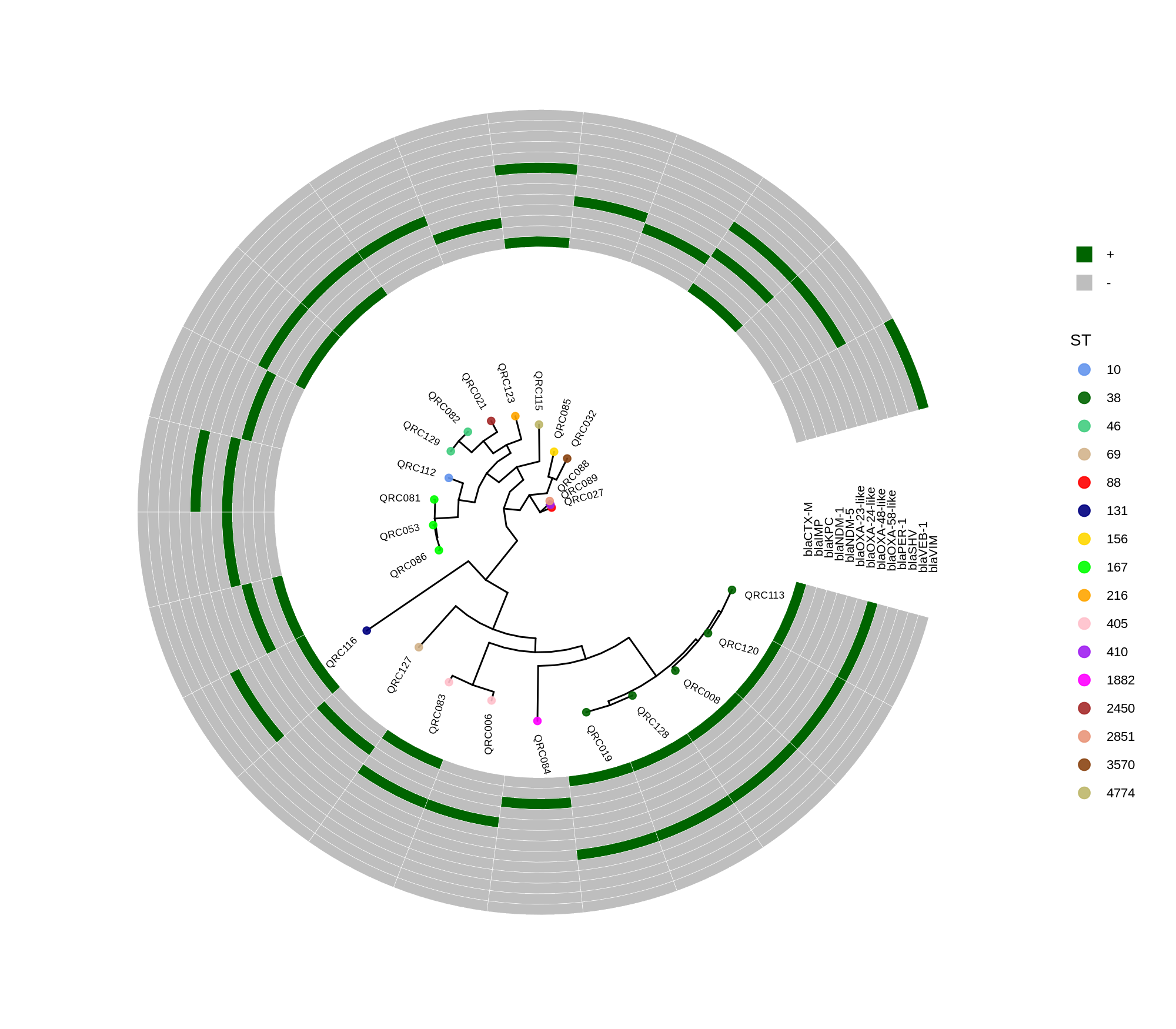
Phylogenetic tree of E. coli isolates using the ggtree and ggplot2 packages (plotTreeHeatmap)

ggtree_and_gheatmap_ecoli
library(ggtree)
library(ggplot2)
library(dplyr)
#setwd("/home/jhuang/DATA/Data_Ben_Boruta_Analysis/plotTreeHeatmap_ecoli/")

info <- read.csv("isolate_ecoli_.csv", sep="\t", check.names = FALSE)
info$name <- info$Isolate
# make ST discrete
info$ST <- factor(info$ST)

tree <- read.tree("../ecoli_core_gene_tree_1000.raxml.bestTree")
cols <- c("10"="cornflowerblue","38"="darkgreen","46"="seagreen3","69"="tan","88"="red",  "131"="navyblue", "156"="gold",     "167"="green","216"="orange","405"="pink","410"="purple","1882"="magenta","2450"="brown", "2851"="darksalmon","3570"="chocolate4","4774"="darkkhaki")
# "290"="azure3", "297"="maroon","325"="lightgreen",     "454"="blue","487"="cyan", "558"="skyblue2", "766"="blueviolet"

#heatmapData2 <- info %>% select(Isolate, blaCTX.M, blaIMP, blaKPC, blaNDM.1, blaNDM.5, blaOXA.23.like, blaOXA.24.like, blaOXA.48.like, blaOXA.58.like, blaPER.1, blaSHV, blaVEB.1, blaVIM)  #ST,
heatmapData2 <- info %>% select(
    Isolate,
    `blaCTX-M`, blaIMP, blaKPC, `blaNDM-1`, `blaNDM-5`,
    `blaOXA-23-like`, `blaOXA-24-like`, `blaOXA-48-like`, `blaOXA-58-like`,
    `blaPER-1`, blaSHV, `blaVEB-1`, blaVIM
)
rn <- heatmapData2$Isolate
heatmapData2$Isolate <- NULL
heatmapData2 <- as.data.frame(sapply(heatmapData2, as.character))
rownames(heatmapData2) <- rn

#heatmap.colours <- c("darkred", "darkblue", "darkgreen", "grey")
#names(heatmap.colours) <- c("MT880870","MT880871","MT880872","-")

#heatmap.colours <- c("cornflowerblue","darkgreen","seagreen3","tan","red",  "navyblue", "gold",     "green","orange","pink","purple","magenta","brown", "darksalmon","chocolate4","darkkhaki", "azure3", "maroon","lightgreen",     "blue","cyan", "skyblue2", "blueviolet",       "darkred", "darkblue", "darkgreen", "grey")
#names(heatmap.colours) <- c("2","5","7","9","14", "17","23",   "35","59","73", "81","86","87","89","130","190","290", "297","325",    "454","487","558","766",       "MT880870","MT880871","MT880872","-")

#heatmap.colours <- c("cornflowerblue","darkgreen","seagreen3","tan","red",  "navyblue", "purple",     "green","cyan",       "darkred", "darkblue", "darkgreen", "grey",  "darkgreen", "grey")
#names(heatmap.colours) <- c("SCCmec_type_II(2A)", "SCCmec_type_III(3A)", "SCCmec_type_III(3A) and SCCmec_type_VIII(4A)", "SCCmec_type_IV(2B)", "SCCmec_type_IV(2B&5)", "SCCmec_type_IV(2B) and SCCmec_type_VI(4B)", "SCCmec_type_IVa(2B)", "SCCmec_type_IVb(2B)", "SCCmec_type_IVg(2B)",  "I", "II", "III", "none", "+","-")

heatmap.colours <- c("darkgreen", "grey")
names(heatmap.colours) <- c("+","-")

#mydat$Regulation <- factor(mydat$Regulation, levels=c("up","down"))
#circular

p <- ggtree(tree, layout='circular', branch.length='none') %<+% info + geom_tippoint(aes(color=ST)) + scale_color_manual(values=cols) + geom_tiplab2(aes(label=name), offset=1)
png("ggtree.png", width=1260, height=1260)
#svg("ggtree.svg", width=1260, height=1260)
p
dev.off()

#gheatmap(p, heatmapData2, width=0.1, colnames_position="top", colnames_angle=90, colnames_offset_y = 0.1, hjust=0.5, font.size=4, offset = 5) + scale_fill_manual(values=heatmap.colours) +  theme(legend.text = element_text(size = 14)) + theme(legend.title = element_text(size = 14)) + guides(fill=guide_legend(title=""), color = guide_legend(override.aes = list(size = 5)))

png("ggtree_and_gheatmap_mibi_selected_genes.png", width=1590, height=1300)
#svg("ggtree_and_gheatmap_mibi_selected_genes.svg", width=17, height=15)
gheatmap(p, heatmapData2, width=2, colnames_position="top", colnames_angle=90, colnames_offset_y = 2.0, hjust=0.7, font.size=4, offset = 8) + scale_fill_manual(values=heatmap.colours) +  theme(legend.text = element_text(size = 16)) + theme(legend.title = element_text(size = 16)) + guides(fill=guide_legend(title=""), color = guide_legend(override.aes = list(size = 5)))
dev.off()

# ---------

# 1) Optional: shrink tree to create more outer space (keeps relative scale)
tree_small <- tree
tree_small$edge.length <- tree_small$edge.length * 0.4    # try 0.3–0.5

# 2) Height after shrinking
ht <- max(ape::node.depth.edgelength(tree_small))

# 3) Base tree
info$ST <- factor(info$ST)
p <- ggtree(tree_small, layout = "circular", open.angle = 20) %<+% info +
    geom_tippoint(aes(color = ST), size = 1.4) +
    geom_tiplab2(aes(label = name), size = 1.4, offset = 0.02 * ht) +
    scale_color_manual(values = cols)

# 4) Reserve room outside the tips
off <- 0.30 * ht   # gap
wid <- 2.80 * ht   # ring thickness
mar <- 0.25 * ht
p_wide <- p + xlim(0, ht + off + wid + mar)

# 5) Ensure discrete values are factors and keep both levels
heatmapData2[] <- lapply(heatmapData2, function(x) factor(x, levels = c("+","-")))

# 6) Draw the heatmap
png("ggtree_and_gheatmap_readable.png", width = 3600, height = 3200, res = 350)
gheatmap(
    p_wide, heatmapData2,
    offset = off,
    width  = wid,
    color  = "white",            # borders between tiles
    colnames = TRUE,
    colnames_position = "top",
    colnames_angle = 0,
    colnames_offset_y = 0.04 * ht,
    hjust = 0.5,
    font.size = 7
) +
    scale_fill_manual(values = c("+"="darkgreen", "-"="grey"), drop = FALSE) +
    guides(
        fill  = guide_legend(title = "", override.aes = list(size = 4)),
        color = guide_legend(override.aes = list(size = 3))
    )
dev.off()

#-------------- plot with true scale -------------

# tree height (root → farthest tip)
ht <- max(ape::node.depth.edgelength(tree))

# circular tree with a small opening and compact labels
p <- ggtree(tree, layout = "circular", open.angle = 20) %<+% info +
    geom_tippoint(aes(color = ST), size = 1.8, alpha = 0.9) +
    geom_tiplab2(aes(label = name), size = 2.2, offset = 0.06 * ht) +
    scale_color_manual(values = cols) +
    theme(legend.title = element_text(size = 12),
                legend.text  = element_text(size = 10))

# higher-DPI export so small cells look crisp
png("ggtree_true_scale.png", width = 2400, height = 2400, res = 300)
p
dev.off()

# --- Heatmap: push it further out and make it wider ---
#svg("ggtree_and_gheatmap_mibi_selected_genes_true_scale.svg",
#    width = 32, height = 28)

png("ggtree_and_gheatmap_mibi_selected_genes_true_scale.png",
        width = 2000, height = 1750,  res = 200)

gheatmap(
    p, heatmapData2,
    offset = 0.24 * ht,         # farther from tips (was 0.08*ht)
    width  = 20.0 * ht,         # much wider ring (was 0.35*ht)
    color  = "white",           # thin tile borders help readability
    colnames_position  = "top",
    colnames_angle     = 90,     # keep column labels horizontal to save space
    colnames_offset_y  = 0.08 * ht,
    hjust = 0.1,
    font.size = 2.6               # bigger column label font
) +
    scale_fill_manual(values = heatmap.colours) +
    guides(fill  = guide_legend(title = "", override.aes = list(size = 4)),
                 color = guide_legend(override.aes = list(size = 3))) +
    theme(legend.position = "right",
                legend.title    = element_text(size = 10),
                legend.text     = element_text(size = 8))
dev.off()

This R script visualizes a phylogenetic tree of E. coli isolates using the ggtree and ggplot2 packages, annotated with sequence type (ST) colors and a heatmap showing the presence or absence of antimicrobial resistance genes. It creates several versions of the circular tree figure to adjust scaling and readability.

Key Steps

  1. Load libraries and data The code imports ggtree, ggplot2, and dplyr, reads isolate metadata (isolate_ecoli_.csv), and loads a phylogenetic tree file (ecoli_core_gene_tree_1000.raxml.bestTree).12
  2. Prepare metadata It defines each isolate’s name and converts the sequence type (ST) into a categorical factor. A subset of columns (various bla resistance gene markers) is selected to create a heatmap data matrix, where each gene’s presence (“+”) or absence (“–”) will be visualized.
  3. Define color schemes Different STs are assigned distinct colors, and binary gene presence/absence states (“+”, “–”) mapped to “darkgreen” and “grey,” respectively.3
  4. Plot tree with annotation The main tree is plotted circularly using:
p <- ggtree(tree, layout='circular', branch.length='none') %<+% info + 
     geom_tippoint(aes(color=ST)) + scale_color_manual(values=cols)

Tip labels are added for isolates, and STs are colored as per the legend.

  1. Add heatmap (gene presence/absence) The gheatmap() function appends the gene matrix to the tree, aligning rows with the tree tips and providing a heatmap of resistance gene patterns.23
  2. Export figures Multiple PNGs are generated:
    • ggtree.png: Basic circular tree
    • ggtree_and_gheatmap_mibi_selected_genes.png: Tree + resistance gene heatmap
    • Scaled versions with adjusted offsets and spacing for improved readability and “true-scale” representations

Final Output

The resulting figures show a circular phylogenetic tree annotated by ST colors, accompanied by a ring-style heatmap indicating the distribution of key resistance genes across isolates. The layout adjustments (tree shrinking, offset tuning, width scaling) ensure legibility when genes or isolates are numerous.23 4567891011121314151617181920

Processing Data_Patricia_Transposon_2025 v2 (Workflow for Structural Variant Calling in Nanopore Sequencing)

  1. Generate the HD46_Ctrol annotation

    mamba activate trycycler
    cd trycycler_HD46_Ctrl;
    trycycler cluster --threads 55 --assemblies assemblies/*.fasta --reads reads.fastq --out_dir trycycler;
    
    trycycler reconcile --threads 55 --reads reads.fastq --cluster_dir trycycler/cluster_001
    mv trycycler/cluster_001/1_contigs/J_ctg000010.fasta .
    mv trycycler/cluster_001/1_contigs/L_tig00000016.fasta .
    mv trycycler/cluster_001/1_contigs/R_tig00000001.fasta .
    mv trycycler/cluster_001/1_contigs/H_utg000001c.fasta .
    
    trycycler reconcile --threads 55 --reads reads.fastq --cluster_dir trycycler/cluster_002
    mv trycycler/cluster_002/1_contigs/*00000*.fasta .
    Error: unable to find a suitable common sequence
    
    trycycler reconcile --threads 55 --reads reads.fastq --cluster_dir trycycler/cluster_003
    mv trycycler/cluster_003/1_contigs/F_tig00000004.fasta .
    mv trycycler/cluster_003/1_contigs/L_tig00000003.fasta .
    
    trycycler reconcile --threads 55 --reads reads.fastq --cluster_dir trycycler/cluster_004
    mv trycycler/cluster_004/1_contigs/J_ctg000000.fasta .
    mv trycycler/cluster_004/1_contigs/P_ctg000000.fasta .
    mv trycycler/cluster_004/1_contigs/S_contig_2.fasta .
    
    trycycler reconcile --threads 55 --reads reads.fastq --cluster_dir trycycler/cluster_005
    trycycler reconcile --threads 55 --reads reads.fastq --cluster_dir trycycler/cluster_006
    trycycler reconcile --threads 55 --reads reads.fastq --cluster_dir trycycler/cluster_007
    trycycler reconcile --threads 55 --reads reads.fastq --cluster_dir trycycler/cluster_008
    
    trycycler reconcile --threads 55 --reads reads.fastq --cluster_dir trycycler/cluster_009
    trycycler reconcile --threads 55 --reads reads.fastq --cluster_dir trycycler/cluster_010
    trycycler reconcile --threads 55 --reads reads.fastq --cluster_dir trycycler/cluster_011
    trycycler reconcile --threads 55 --reads reads.fastq --cluster_dir trycycler/cluster_012
    trycycler reconcile --threads 55 --reads reads.fastq --cluster_dir trycycler/cluster_013
    trycycler reconcile --threads 55 --reads reads.fastq --cluster_dir trycycler/cluster_014
    trycycler reconcile --threads 55 --reads reads.fastq --cluster_dir trycycler/cluster_015
    trycycler reconcile --threads 55 --reads reads.fastq --cluster_dir trycycler/cluster_016
    trycycler reconcile --threads 55 --reads reads.fastq --cluster_dir trycycler/cluster_017
    trycycler reconcile --threads 55 --reads reads.fastq --cluster_dir trycycler/cluster_018
    trycycler reconcile --threads 55 --reads reads.fastq --cluster_dir trycycler/cluster_019
    trycycler reconcile --threads 55 --reads reads.fastq --cluster_dir trycycler/cluster_020
    trycycler reconcile --threads 55 --reads reads.fastq --cluster_dir trycycler/cluster_021
    trycycler reconcile --threads 55 --reads reads.fastq --cluster_dir trycycler/cluster_022
    trycycler reconcile --threads 55 --reads reads.fastq --cluster_dir trycycler/cluster_023
    trycycler reconcile --threads 55 --reads reads.fastq --cluster_dir trycycler/cluster_024
    trycycler reconcile --threads 55 --reads reads.fastq --cluster_dir trycycler/cluster_025
    trycycler reconcile --threads 55 --reads reads.fastq --cluster_dir trycycler/cluster_026
    trycycler reconcile --threads 55 --reads reads.fastq --cluster_dir trycycler/cluster_027
    trycycler reconcile --threads 55 --reads reads.fastq --cluster_dir trycycler/cluster_028
    trycycler reconcile --threads 55 --reads reads.fastq --cluster_dir trycycler/cluster_029
    
    trycycler msa --threads 55 --cluster_dir trycycler/cluster_001
    trycycler msa --threads 55 --cluster_dir trycycler/cluster_004
    
    trycycler partition --threads 55 --reads reads.fastq --cluster_dirs trycycler/cluster_001
    trycycler partition --threads 55 --reads reads.fastq --cluster_dirs trycycler/cluster_004
    
    trycycler consensus --threads 55 --cluster_dir trycycler/cluster_001
    trycycler consensus --threads 55 --cluster_dir trycycler/cluster_004
    
    #Polish --> TODO: Need to be Debugged!
    for c in trycycler/cluster_001 trycycler/cluster_004; do
        medaka_consensus -i "$c"/4_reads.fastq -d "$c"/7_final_consensus.fasta -o "$c"/medaka  -m r941_min_sup_g507 -t 12
        mv "$c"/medaka/consensus.fasta "$c"/8_medaka.fasta
        rm -r "$c"/medaka "$c"/*.fai "$c"/*.mmi  # clean up
    done
    # cat trycycler/cluster_*/8_medaka.fasta > trycycler/consensus.fasta
    
    cp trycycler/cluster_001/7_final_consensus.fasta HD46_Ctrl_chr.fasta
    cp trycycler/cluster_004/7_final_consensus.fasta HD46_Ctrl_plasmid.fasta
  2. install mambaforge https://conda-forge.org/miniforge/ (recommended)

    #download Mambaforge-24.9.2-0-Linux-x86_64.sh from website
    chmod +x Mambaforge-24.9.2-0-Linux-x86_64.sh
    ./Mambaforge-24.9.2-0-Linux-x86_64.sh
    
    To activate this environment, use:
        micromamba activate /home/jhuang/mambaforge
    Or to execute a single command in this environment, use:
        micromamba run -p /home/jhuang/mambaforge mycommand
    installation finished.
    
    Do you wish to update your shell profile to automatically initialize conda?
    This will activate conda on startup and change the command prompt when activated.
    If you'd prefer that conda's base environment not be activated on startup,
      run the following command when conda is activated:
    
    conda config --set auto_activate_base false
    
    You can undo this by running `conda init --reverse $SHELL`? [yes|no]
    [no] >>> yes
    no change     /home/jhuang/mambaforge/condabin/conda
    no change     /home/jhuang/mambaforge/bin/conda
    no change     /home/jhuang/mambaforge/bin/conda-env
    no change     /home/jhuang/mambaforge/bin/activate
    no change     /home/jhuang/mambaforge/bin/deactivate
    no change     /home/jhuang/mambaforge/etc/profile.d/conda.sh
    no change     /home/jhuang/mambaforge/etc/fish/conf.d/conda.fish
    no change     /home/jhuang/mambaforge/shell/condabin/Conda.psm1
    no change     /home/jhuang/mambaforge/shell/condabin/conda-hook.ps1
    no change     /home/jhuang/mambaforge/lib/python3.12/site-packages/xontrib/conda.xsh
    no change     /home/jhuang/mambaforge/etc/profile.d/conda.csh
    modified      /home/jhuang/.bashrc
    ==> For changes to take effect, close and re-open your current shell. <==
    no change     /home/jhuang/mambaforge/condabin/conda
    no change     /home/jhuang/mambaforge/bin/conda
    no change     /home/jhuang/mambaforge/bin/conda-env
    no change     /home/jhuang/mambaforge/bin/activate
    no change     /home/jhuang/mambaforge/bin/deactivate
    no change     /home/jhuang/mambaforge/etc/profile.d/conda.sh
    no change     /home/jhuang/mambaforge/etc/fish/conf.d/conda.fish
    no change     /home/jhuang/mambaforge/shell/condabin/Conda.psm1
    no change     /home/jhuang/mambaforge/shell/condabin/conda-hook.ps1
    no change     /home/jhuang/mambaforge/lib/python3.12/site-packages/xontrib/conda.xsh
    no change     /home/jhuang/mambaforge/etc/profile.d/conda.csh
    no change     /home/jhuang/.bashrc
    No action taken.
    WARNING conda.common.path.windows:_path_to(100): cygpath is not available, fallback to manual path conversion
    WARNING conda.common.path.windows:_path_to(100): cygpath is not available, fallback to manual path conversion
    Added mamba to /home/jhuang/.bashrc
    ==> For changes to take effect, close and re-open your current shell. <==
    Thank you for installing Mambaforge!
    
    Close your terminal window and open a new one, or run:
    #source ~/mambaforge/bin/activate
    conda --version
    mamba --version
    
    https://github.com/conda-forge/miniforge/releases
    Note
    
        * After installation, please make sure that you do not have the Anaconda default channels configured.
            conda config --show channels
            conda config --remove channels defaults
            conda config --add channels conda-forge
            conda config --show channels
            conda config --set channel_priority strict
            #conda clean --all
            conda config --remove channels biobakery
    
        * !!!!Do not install anything into the base environment as this might break your installation. See here for details.!!!!
    
    # --Deprecated method: mamba installing on conda--
    #conda install -n base --override-channels -c conda-forge mamba 'python_abi=*=*cp*'
    #    * Note that installing mamba into any other environment than base is not supported.
    #
    #conda activate base
    #conda install conda
    #conda uninstall mamba
    #conda install mamba

2: install required Tools on the mamba env

    * Sniffles2: Detect structural variants, including transposons, from long-read alignments.
    * RepeatModeler2: Identify and classify transposons de novo.
    * RepeatMasker: Annotate known transposable elements using transposon libraries.
    * SVIM: An alternative structural variant caller optimized for long-read sequencing, if needed.
    * SURVIVOR: Consolidate structural variants across samples for comparative analysis.

    mamba deactivate
    # Create a new conda environment
    mamba create -n transposon_long python=3.6 -y

    # Activate the environment
    mamba activate transposon_long

    mamba install -c bioconda sniffles
    mamba install -c bioconda repeatmodeler repeatmasker

    # configure repeatmasker database
    mamba info --envs
    cd /home/jhuang/mambaforge/envs/transposon_long/share/RepeatMasker

    #mamba install python=3.6
    mamba install -c bioconda svim
    mamba install -c bioconda survivor
  1. Test the installed tools

    # Check versions
    sniffles --version
    RepeatModeler -h
    RepeatMasker -h
    svim --help
    SURVIVOR --help
    mamba install -c conda-forge perl r
  2. Data Preparation

    Raw Signal Data: Nanopore devices generate electrical signal data as DNA passes through the nanopore.
    Basecalling: Tools like Guppy or Dorado are used to convert raw signals into nucleotide sequences (FASTQ files).
  3. Preprocessing

    Quality Filtering: Remove low-quality reads using tools like Filtlong or NanoFilt.
    Adapter Trimming: Identify and remove sequencing adapters with tools like Porechop.
  4. (Optional) Variant Calling for SNP and Indel Detection:

    Tools like Medaka, Longshot, or Nanopolish analyze the aligned reads to identify SNPs and small indels.
  5. (OFFICIAL STARTING POINT) Alignment and Structural Variant Calling: Tools such as Sniffles or SVIM detect large insertions, deletions, and other structural variants. 使用长读长测序工具如 SVIM 或 Sniffles 检测结构变异(e.g. 散在性重复序列)。

      #NOTE that the ./batch1_depth25/trycycler_WT/reads.fastq and F24A430001437_BACctmoD/BGI_result/Separate/${sample}/1.Cleandata/${sample}.filtered_reads.fq.gz are the same!
    
      # -- PREPARING the input fastq-data, merge the fastqz and move the top-directory
    
      # Under raw_data/no_sample_id/20250731_0943_MN45170_FBD12615_97f118c2/fastq_pass
      zcat ./barcode01/FBD12615_pass_barcode01_97f118c2_aa46ecf7_0.fastq.gz ./barcode01/FBD12615_pass_barcode01_97f118c2_aa46ecf7_1.fastq.gz ./barcode01/FBD12615_pass_barcode01_97f118c2_aa46ecf7_2.fastq.gz ./barcode01/FBD12615_pass_barcode01_97f118c2_aa46ecf7_3.fastq.gz ... | gzip > HD46_1.fastq.gz
      mv ./raw_data/no_sample_id/20250731_0943_MN45170_FBD12615_97f118c2/fastq_pass/HD46_1.fastq.gz ~/DATA/Data_Patricia_Transposon_2025
    
        #this are the corresponding sample names:
        #barcode 1: HD46-1
        #barcode 2: HD46-2
        #barcode 3: HD46-3
        #barcode 4: HD46-4
        mv barcode01.fastq.gz HD46_1.fastq.gz
        mv barcode02.fastq.gz HD46_2.fastq.gz
        mv barcode03.fastq.gz HD46_3.fastq.gz
        mv barcode04.fastq.gz HD46_4.fastq.gz
    
      # -- CALCULATE the coverages
        #!/bin/bash
    
        for bam in barcode*_minimap2.sorted.bam; do
            echo "Processing $bam ..."
            avg_cov=$(samtools depth -a "$bam" | awk '{sum+=$3; cnt++} END {if (cnt>0) print sum/cnt; else print 0}')
            echo -e "${bam}\t${avg_cov}" >> coverage_summary.txt
        done
    
      # ---- !!!! LOGIN the suitable environment !!!! ----
      # !!!!!!!!!!!!!!!!!!!!!!!!!!!!!!!!!!!!!!!!!!!!!!!!!!!!!!! #
      mamba activate transposon_long
    
      # -- TODO: AFTERNOON_DEBUG_THIS: FAILED and not_USED: Alignment and Detect structural variants in each sample using SVIM which used aligner ngmlr or mimimap2
      #mamba install -c bioconda ngmlr
      mamba install -c bioconda svim
    
      #SEARCH FOR "HD46_Ctrl_chr_plasmid.fasta" for finding the insertion-calling-commands
      # !!!!!!!!!!!!!!!!!!!!!!!!!!!!!!!!!!!!!!!!!!!!!!!!!!!!!!! for all 4 options #
      # ---- Option_1: minimap2 (aligner) + SVIM (structural variant caller) --> SUCCESSFUL ----
    
      for sample in HD46_1 HD46_2 HD46_3 HD46_4 HD46_5 HD46_6 HD46_7 HD46_8 HD46_13; do
          #INS,INV,DUP:TANDEM,DUP:INT,BND
          svim reads --aligner minimap2 --nanopore minimap2+svim_${sample}    ${sample}.fastq.gz HD46_Ctrl_chr_plasmid.fasta  --cores 20 --types INS --min_sv_size 100 --sequence_allele --insertion_sequences --read_names;
      done
    
      #svim alignment svim_alignment_minmap2_1_re 1.sorted.bam CP020463_.fasta --types INS --sequence_alleles --insertion_sequences --read_names
    
      # ---- Option_2: minamap2 (aligner) + Sniffles2 (structural variant caller) --> SUCCESSFUL ----
      #Minimap2: A commonly used aligner for nanopore sequencing data.
      #    Align Long Reads to the WT Reference using Minimap2
      #sniffles -m WT.sorted.bam -v WT.vcf -s 10 -l 50 -t 60
      #  -s 20: Requires at least 20 reads to support an SV for reporting. --> 10
      #  -l 50: Reports SVs that are at least 50 base pairs long.
      #  -t 60: Uses 60 threads for faster processing.
      for sample in HD46_1 HD46_2 HD46_3 HD46_4 HD46_5 HD46_6 HD46_7 HD46_8 HD46_13; do
          #minimap2 --MD -t 60 -ax map-ont HD46_Ctrl_chr_plasmid.fasta ./batch1_depth25/trycycler_${sample}/reads.fastq | samtools sort -o ${sample}.sorted.bam
          minimap2 --MD -t 60 -ax map-ont HD46_Ctrl_chr_plasmid.fasta ${sample}.fastq.gz | samtools sort -o ${sample}_minimap2.sorted.bam
          samtools index ${sample}_minimap2.sorted.bam
          sniffles -m ${sample}_minimap2.sorted.bam -v ${sample}_minimap2+sniffles.vcf -s 10 -l 50 -t 60
          #QUAL < 20 ||
          bcftools filter -e "INFO/SVTYPE != 'INS'" ${sample}_minimap2+sniffles.vcf > ${sample}_minimap2+sniffles_filtered.vcf
      done
    
        #Estimating parameter...
        #        Max dist between aln events: 44
        #        Max diff in window: 76
        #        Min score ratio: 2
        #        Avg DEL ratio: 0.0112045
        #        Avg INS ratio: 0.0364027
        #Start parsing... CP020463
        #                # Processed reads: 10000
        #                # Processed reads: 20000
        #        Finalizing  ..
        #Start genotype calling:
        #        Reopening Bam file for parsing coverage
        #        Finalizing  ..
        #Estimating parameter...
        #        Max dist between aln events: 28
        #        Max diff in window: 89
        #        Min score ratio: 2
        #        Avg DEL ratio: 0.013754
        #        Avg INS ratio: 0.17393
        #Start parsing... CP020463
        #                # Processed reads: 10000
        #                # Processed reads: 20000
        #                # Processed reads: 30000
        #                # Processed reads: 40000
    
        # Results:
        # * barcode01_minimap2+sniffles.vcf
        # * barcode01_minimap2+sniffles_filtered.vcf
        # * barcode02_minimap2+sniffles.vcf
        # * barcode02_minimap2+sniffles_filtered.vcf
        # * barcode03_minimap2+sniffles.vcf
        # * barcode03_minimap2+sniffles_filtered.vcf
        # * barcode04_minimap2+sniffles.vcf
        # * barcode04_minimap2+sniffles_filtered.vcf
    
      #ERROR: No MD string detected! Check bam file! Otherwise generate using e.g. samtools. --> No results!
      #for sample in barcode01 barcode02 barcode03 barcode04; do
      #    sniffles -m svim_reads_minimap2_${sample}/${sample}.fastq.minimap2.coordsorted.bam -v sniffles_minimap2_${sample}.vcf -s 10 -l 50 -t 60
      #    bcftools filter -e "INFO/SVTYPE != 'INS'" sniffles_minimap2_${sample}.vcf > sniffles_minimap2_${sample}_filtered.vcf
      #done
    
      # ---- Option_3: NGMLR (aligner) + SVIM (structural variant caller) --> SUCCESSFUL ----
      for sample in HD46_1 HD46_2 HD46_3 HD46_4 HD46_5 HD46_6 HD46_7 HD46_8 HD46_13; do
          svim reads --aligner ngmlr --nanopore    ngmlr+svim_${sample}       ${sample}.fastq.gz HD46_Ctrl_chr_plasmid.fasta  --cores 10;
      done
    
      # ---- Option_4: NGMLR (aligner) + sniffles (structural variant caller) --> SUCCESSFUL ----
      for sample in HD46_1 HD46_2 HD46_3 HD46_4 HD46_5 HD46_6 HD46_7 HD46_8 HD46_13; do
          sniffles -m ngmlr+svim_${sample}/${sample}.fastq.ngmlr.coordsorted.bam -v ${sample}_ngmlr+sniffles.vcf -s 10 -l 50 -t 60
          bcftools filter -e "INFO/SVTYPE != 'INS'" ${sample}_ngmlr+sniffles.vcf > ${sample}_ngmlr+sniffles_filtered.vcf
      done
    
      #END
  6. Compare and integrate all results produced by minimap2+sniffles and ngmlr+sniffles, and check them each position in IGV!

    # !!!!!!!!!!!!!!!!!!!!!!!!!!!!!!!!!!!!!!!!!!!!!!!!!!!!!!! #
    mv HD46_1_minimap2+sniffles_filtered.vcf    HD46-1_minimap2+sniffles_filtered.vcf
    mv HD46_1_ngmlr+sniffles_filtered.vcf       HD46-1_ngmlr+sniffles_filtered.vcf
    mv HD46_2_minimap2+sniffles_filtered.vcf    HD46-2_minimap2+sniffles_filtered.vcf
    mv HD46_2_ngmlr+sniffles_filtered.vcf       HD46-2_ngmlr+sniffles_filtered.vcf
    mv HD46_3_minimap2+sniffles_filtered.vcf    HD46-3_minimap2+sniffles_filtered.vcf
    mv HD46_3_ngmlr+sniffles_filtered.vcf       HD46-3_ngmlr+sniffles_filtered.vcf
    mv HD46_4_minimap2+sniffles_filtered.vcf    HD46-4_minimap2+sniffles_filtered.vcf
    mv HD46_4_ngmlr+sniffles_filtered.vcf       HD46-4_ngmlr+sniffles_filtered.vcf
    mv HD46_5_minimap2+sniffles_filtered.vcf    HD46-5_minimap2+sniffles_filtered.vcf
    mv HD46_5_ngmlr+sniffles_filtered.vcf       HD46-5_ngmlr+sniffles_filtered.vcf
    mv HD46_6_minimap2+sniffles_filtered.vcf    HD46-6_minimap2+sniffles_filtered.vcf
    mv HD46_6_ngmlr+sniffles_filtered.vcf       HD46-6_ngmlr+sniffles_filtered.vcf
    mv HD46_7_minimap2+sniffles_filtered.vcf    HD46-7_minimap2+sniffles_filtered.vcf
    mv HD46_7_ngmlr+sniffles_filtered.vcf       HD46-7_ngmlr+sniffles_filtered.vcf
    mv HD46_8_minimap2+sniffles_filtered.vcf    HD46-8_minimap2+sniffles_filtered.vcf
    mv HD46_8_ngmlr+sniffles_filtered.vcf       HD46-8_ngmlr+sniffles_filtered.vcf
    mv HD46_13_minimap2+sniffles_filtered.vcf   HD46-13_minimap2+sniffles_filtered.vcf
    mv HD46_13_ngmlr+sniffles_filtered.vcf      HD46-13_ngmlr+sniffles_filtered.vcf
  7. (NOT_USED) Filtering low-complexity insertions using RepeatMasker (TODO: how to use RepeatModeler to generate own lib?)

      python vcf_to_fasta.py variants.vcf variants.fasta
      #python filter_low_complexity.py variants.fasta filtered_variants.fasta retained_variants.fasta
      #Using RepeatMasker to filter the low-complexity fasta, the used h5 lib is
      /home/jhuang/mambaforge/envs/transposon_long/share/RepeatMasker/Libraries/Dfam.h5    #1.9G
      python /home/jhuang/mambaforge/envs/transposon_long/share/RepeatMasker/famdb.py -i /home/jhuang/mambaforge/envs/transposon_long/share/RepeatMasker/Libraries/Dfam.h5 names 'bacteria' | head
      Exact Matches
      =============
      2 bacteria (blast name), Bacteria 
    (scientific name), eubacteria (genbank common name), Monera (in-part), Procaryotae (in-part), Prokaryota (in-part), Prokaryotae (in-part), prokaryote (in-part), prokaryotes (in-part) Non-exact Matches ================= 1783272 Terrabacteria group (scientific name) 91061 Bacilli (scientific name), Bacilli Ludwig et al. 2010 (authority), Bacillus/Lactobacillus/Streptococcus group (synonym), Firmibacteria (synonym), Firmibacteria Murray 1988 (authority) 1239 Bacillaeota (synonym), Bacillaeota Oren et al. 2015 (authority), Bacillota (synonym), Bacillus/Clostridium group (synonym), clostridial firmicutes (synonym), Clostridium group firmicutes (synonym), Firmacutes (synonym), firmicutes (blast name), Firmicutes (scientific name), Firmicutes corrig. Gibbons and Murray 1978 (authority), Low G+C firmicutes (synonym), low G+C Gram-positive bacteria (common name), low GC Gram+ (common name) Summary of Classes within Firmicutes: * Bacilli (includes many common pathogenic and non-pathogenic Gram-positive bacteria, taxid=91061) * Bacillus (e.g., Bacillus subtilis, Bacillus anthracis) * Staphylococcus (e.g., Staphylococcus aureus, Staphylococcus epidermidis) * Streptococcus (e.g., Streptococcus pneumoniae, Streptococcus pyogenes) * Listeria (e.g., Listeria monocytogenes) * Clostridia (includes many anaerobic species like Clostridium and Clostridioides) * Erysipelotrichia (intestinal bacteria, some pathogenic) * Tissierellia (less-studied, veterinary relevance) * Mollicutes (cell wall-less, includes Mycoplasma species) * Negativicutes (includes some Gram-negative, anaerobic species) RepeatMasker -species Bacilli -pa 4 -xsmall variants.fasta python extract_unmasked_seq.py variants.fasta.masked unmasked_variants.fasta #bcftools filter -i ‘QUAL>30 && INFO/SVLEN>100’ variants.vcf -o filtered.vcf # #bcftools view -i ‘SVTYPE=”INS”‘ variants.vcf | bcftools query -f ‘%CHROM\t%POS\t%REF\t%ALT\t%INFO\n’ > insertions.txt #mamba install -c bioconda vcf2fasta #vcf2fasta variants.vcf -o insertions.fasta #grep “SEQS” variants.vcf | awk ‘{ print $1, $2, $4, $5, $8 }’ > insertions.txt #python3 filtering_low_complexity.py # #vcftools –vcf input.vcf –recode –out filtered_output –minSVLEN 100 #bcftools filter -e ‘INFO/SEQS ~ “^(G+|C+|T+|A+){4,}”‘ variants.vcf -o filtered.vcf # — calculate the percentage of reads To calculate the percentage of reads that contain the insertion from the VCF entry, use the INFO and FORMAT fields provided in the VCF record. Step 1: Extract Relevant Information In the provided VCF entry: RE (Reads Evidence): 733 – the total number of reads supporting the insertion. GT (Genotype): 1/1 – this indicates a homozygous insertion, meaning all reads covering this region are expected to have the insertion. AF (Allele Frequency): 1 – a 100% allele frequency, indicating that every read in this sample supports the insertion. DR (Depth Reference): 0 – the number of reads supporting the reference allele. DV (Depth Variant): 733 – the number of reads supporting the variant allele (insertion). Step 2: Calculate Percentage of Reads Supporting the Insertion Using the formula: Percentage of reads with insertion=(DVDR+DV)×100 Percentage of reads with insertion=(DR+DVDV​)×100 Substitute the values: Percentage=(7330+733)×100=100% Percentage=(0+733733​)×100=100% Conclusion Based on the VCF record, 100% of the reads support the insertion, indicating that the insertion is fully present in the sample (homozygous insertion). This is consistent with the AF=1 and GT=1/1 fields. * In your VCF file generated by Sniffles, the REF=N in the results has a specific meaning: * In a standard VCF, the REF field usually contains the reference base(s) at the variant position. * For structural variants (SVs), especially insertions, there is no reference sequence replaced; the insertion occurs between reference bases. * Therefore, Sniffles uses N as a placeholder in the REF field to indicate “no reference base replaced”. * The actual inserted sequence is then stored in the ALT field.
  8. Why some records have UNRESOLVED in the FILTER field in the Excel output.

    1. Understanding the format
    
        The data appears to be structural variant (SV) calls from Sniffles, probably in a VCF-like tabular format exported to Excel:
    
            * gi|1176884116|gb|CP020463.1| → reference sequence
            * Positions: 1855752 and 2422820
            * N → insertion event
            * SVLEN=999 → size of the insertion
            * AF → allele frequency
            * GT:DR:DV → genotype, depth reference, depth variant (1/1:0:678, example values for a PASS variant)
            * FILTER → whether the variant passed filters (UNRESOLVED means it didn’t pass)
    
    2. What UNRESOLVED usually means
    
        In Sniffles:
    
        * UNRESOLVED is assigned to SVs when the tool cannot confidently resolve the exact sequence or breakpoint.
        * Reasons include:
            - Low read support (RE, DV) relative to the expected coverage
            - Ambiguous alignment at repetitive regions
            - Conflicting strand or orientation signals
            - Allele frequency inconsistent with expectations
    
    3. Examine your two records
    
        First record
    
            POS: 1855752
            SVTYPE: INS
            SVLEN: 999
            RE: 68
            AF: 1
            GT: 1/1
            FILTER: UNRESOLVED
    
        Observations:
    
        * AF = 1 → allele frequency 100%, homozygous insertion
        * RE = 68 → 68 reads support the variant, decent coverage
        * Still UNRESOLVED → likely because Sniffles could not resolve the inserted sequence precisely; sometimes long insertions in repetitive regions are hard to reconstruct fully even with good read support.
    
        Second record
    
            POS: 2422820
            SVTYPE: INS
            SVLEN: 999
            RE: 22
            AF: 0.025522
            GT: 0/0
            FILTER: UNRESOLVED
    
        Observations:
    
        * AF = 0.0255 → very low allele frequency (~2.5%)
        * RE = 22, DR = 840 → very low variant reads vs reference
        * GT = 0/0 → homozygous reference
        * Sniffles marks it UNRESOLVED because the variant is essentially noise, not confidently detected.
    
    4. Key difference between the two
        Feature First record    Second record
        Allele frequency (AF)   1 (high)    0.0255 (very low)
        Variant reads (RE)  68  22
        Genotype (GT)   1/1 0/0
        Reason for UNRESOLVED   Unresolvable inserted sequence
    
    ✅ 5. Conclusion
    
        * Sniffles marks a variant as UNRESOLVED when the SV cannot be confidently characterized.
        * Even if there is good read support (first record), complex insertions can’t always be reconstructed fully.
        * Very low allele frequency (second record) also triggers UNRESOLVED because the signal is too weak compared to background noise.
        * Essentially: “UNRESOLVED” ≠ bad data, it’s just unresolved uncertainty.
  9. (NOT_SURE_HOW_TO_USE) Polishing of assembly: Use tools like Medaka to refine variant calls by leveraging consensus sequences derived from nanopore data.

      mamba install -c bioconda medaka
      medaka-consensus -i aligned_reads.bam -r reference.fasta -o polished_output -t 4
  10. Compare Insertions Across Samples

    Merge Variants Across Samples: Use SURVIVOR to merge and compare the detected insertions in all samples against the WT:
    
    SURVIVOR merge input_vcfs.txt 1000 1 1 1 0 30 merged.vcf
    
        Input: List of VCF files from Sniffles2.
        Output: A consolidated VCF file with shared and unique variants.
    
    Filter WT Insertions:
    
        Identify transposons present only in samples 1–9 by subtracting WT variants using bcftools:
    
            bcftools isec WT.vcf merged.vcf -p comparison_results
  11. Validate and Visualize

    Visualize with IGV: Use IGV to inspect insertion sites in the alignment and confirm quality.
    
    igv.sh
    
    Validate Findings:
        Perform PCR or additional sequencing for key transposon insertion sites to confirm results.
  12. Alternatives to TEPID for Long-Read Data

    If you’re looking for transposon-specific tools for long reads:
    
        REPET: A robust transposon annotation tool compatible with assembled genomes.
        EDTA (Extensive de novo TE Annotator):
            A pipeline to identify, classify, and annotate transposons.
            Works directly on your assembled genomes.
    
            perl EDTA.pl --genome WT.fasta --type all
  13. The WT.vcf file in the pipeline is generated by detecting structural variants (SVs) in the wild-type (WT) genome aligned against itself or using it as a baseline reference. Here’s how you can generate the WT.vcf:

    Steps to Generate WT.vcf
    1. Align WT Reads to the WT Reference Genome
    
    The goal here is to create an alignment of the WT sequencing data to the WT reference genome to detect any self-contained structural variations, such as native insertions, deletions, or duplications.
    
    Command using Minimap2:
    
    minimap2 -ax map-ont WT.fasta WT_reads.fastq | samtools sort -o WT.sorted.bam
    
    Index the BAM file:
    
    samtools index WT.sorted.bam
    
    2. Detect Structural Variants with Sniffles2
    
    Run Sniffles2 on the WT alignment to call structural variants:
    
    sniffles --input WT.sorted.bam --vcf WT.vcf
    
    This step identifies:
    
        Native transposons and insertions present in the WT genome.
        Other structural variants that are part of the reference genome or sequencing artifacts.
    
    Key parameters to consider:
    
        --min_support: Adjust based on your WT sequencing coverage.
        --max_distance: Define proximity for merging variants.
        --min_length: Set a minimum SV size (e.g., >50 bp for transposons).
  14. Clean and Filter the WT.vcf, Variant Filtering: Remove low-confidence variants based on read depth, quality scores, or allele frequency.

    To ensure the WT.vcf only includes relevant transposons or SVs:
    
        Use bcftools or similar tools to filter out low-confidence variants:
    
        bcftools filter -e "QUAL < 20 || INFO/SVTYPE != 'INS'" WT.vcf > WT_filtered.vcf
        bcftools filter -e "QUAL < 1 || INFO/SVTYPE != 'INS'" 1_.vcf > 1_filtered_.vcf
  15. NOTE that in this pipeline, the WT.fasta (reference genome) is typically a high-quality genome sequence from a database or a well-annotated version of your species’ genome. It is not assembled from the WT.fastq sequencing reads in this context. Here’s why:

    Why Use a Reference Genome (WT.fasta) from a Database?
    
        Higher Quality and Completeness:
            Database references (e.g., NCBI, Ensembl) are typically well-assembled, highly polished, and annotated. They serve as a reliable baseline for variant detection.
    
        Consistency:
            Using a standard reference ensures consistent comparisons across your WT and samples (1–9). Variants detected will be relative to this reference, not influenced by possible assembly errors.
    
        Saves Time:
            Assembling a reference genome from WT reads requires significant computational effort. Using an existing reference streamlines the analysis.
    
    Alternative: Assembling WT from FASTQ
    
    If you don’t have a high-quality reference genome (WT.fasta) and must rely on your WT FASTQ reads:
    
        Assemble the genome from your WT.fastq:
            Use long-read assemblers like Flye, Canu, or Shasta to create a draft genome.
    
        flye --nano-raw WT.fastq --out-dir WT_assembly --genome-size 
    Polish the assembly using tools like Racon (with the same reads) or Medaka for higher accuracy. Use the assembled and polished genome as your WT.fasta reference for further steps. Key Takeaways: If you have access to a reliable, high-quality reference genome, use it as the WT.fasta. Only assemble WT.fasta from raw reads (WT.fastq) if no database reference is available for your organism.
  16. Annotate Transposable Elements: Tools like ANNOVAR or SnpEff provide functional insights into the detected variants.

    # !!!!!!!!!!!!!!!!!!!!!!!!!!!!!!!!!!!!!!!!!!!!!!!!!!!!!!! #
    #Using snpEff to annotate the insertion!
    conda activate /home/jhuang/miniconda3/envs/spandx
# --> BUG:
LOCUS       HD46_Ctrl 2707468 bp    DNA     circular BCT
    02-OCT-2025
DEFINITION  Staphylococcus epidermidis strain HD46-ctrl chromosome, whole
            genome shotgun sequence.
ACCESSION
VERSION

# --> DEBUG: adapt the genbank-file header as follows:
LOCUS       HD46_Ctrl 2707468 bp    DNA     circular BCT 02-OCT-2025
DEFINITION  Staphylococcus epidermidis strain HD46-ctrl chromosome, whole
            genome shotgun sequence.
ACCESSION   HD46_Ctrl
VERSION     HD46_Ctrl.1
DBLINK      BioProject: PRJNA1337321
            BioSample: SAMN52215988
KEYWORDS    .
SOURCE      Staphylococcus epidermidis
  ORGANISM  Staphylococcus epidermidis
            Bacteria; Firmicutes; Bacilli; Bacillales; Staphylococcaceae;
            Staphylococcus.
COMMENT     Annotated genome for HD46_Ctrl.
...
    # !!!!!!!!!!!!!!!!!!!!!!!!!!!!!!!!!!!!!!!!!!!!!!!!!!!!!!! #
    mkdir ~/miniconda3/envs/spandx/share/snpeff-5.1-2/data/HD46_Ctrl
    cp HD46_Ctrl_chr.gb ~/miniconda3/envs/spandx/share/snpeff-5.1-2/data/HD46_Ctrl/genes.gbk

    vim ~/miniconda3/envs/spandx/share/snpeff-5.1-2/snpEff.config  #HD46_Ctrl.genome : HD46_Ctrl
    /home/jhuang/miniconda3/envs/spandx/bin/snpEff build -genbank HD46_Ctrl      -d

    sed -i 's/^cluster_001_consensus/HD46_Ctrl.1/' HD46-8_ngmlr+sniffles_filtered.vcf
    sed -i 's/^cluster_001_consensus/HD46_Ctrl.1/' HD46-13_ngmlr+sniffles_filtered.vcf
    #snpEff eff -nodownload -no-downstream -no-intergenic -ud 100 -v HD46_Ctrl HD46-8_ngmlr+sniffles_filtered.vcf > HD46-8_ngmlr+sniffles_filtered.annotated.vcf
    #snpEff eff -nodownload -no-downstream -no-intergenic -ud 100 -v HD46_Ctrl HD46-13_ngmlr+sniffles_filtered.vcf > HD46-13_ngmlr+sniffles_filtered.annotated.vcf

    # HD46-8
    snpEff ann -Xmx8g -v -hgvs -canon -ud 200 \
    -stats HD46-8_snpeff_stats.html \
    HD46_Ctrl \
    HD46-8_ngmlr+sniffles_filtered.vcf \
    > HD46-8_ngmlr+sniffles_filtered.annotated.vcf

    # HD46-13
    snpEff ann -Xmx8g -v -hgvs -canon -ud 200 \
    -stats HD46-13_snpeff_stats.html \
    HD46_Ctrl \
    HD46-13_ngmlr+sniffles_filtered.vcf \
    > HD46-13_ngmlr+sniffles_filtered.annotated.vcf
  1. Summarize the results as a Excel-file

    # !!!!!!!!!!!!!!!!!!!!!!!!!!!!!!!!!!!!!!!!!!!!!!!!!!!!!!! #
    conda activate plot-numpy1
    #python generate_common_vcf.py
    #mv common_variants.xlsx putative_transposons.xlsx
    
    # * Reads each of your VCFs.
    # * Filters variants → only keep those with FILTER == PASS.
    # * Compares the two aligner methods (minimap2+sniffles2 vs ngmlr+sniffles2) per sample.
    # * Keeps only variants that appear in both methods for the same sample.
    # * Outputs: An Excel file with the common variants and a log text file listing which variants were filtered out, and why (not_PASS or not_COMMON_in_two_VCF).
    
    #python generate_fuzzy_common_vcf_v1.py
    #Sample PASS_minimap2   PASS_ngmlr  COMMON
    #  HD46-Ctrl_Ctrl   39  29  28
    #  HD46-1   39  32  29
    #  HD46-2   40  32  28
    #  HD46-3   38  30  27
    #  HD46-4   46  35  32
    #  HD46-5   40  35  31
    #  HD46-6   43  35  30
    #  HD46-7   40  33  28
    #  HD46-8   37  20  11
    #  HD46-13  39  38  27
    
    #Sample PASS_minimap2   PASS_ngmlr  COMMON_FINAL
    #HD46-Ctrl_Ctrl 39  29  6
    #HD46-1 39  32  8
    #HD46-2 40  32  8
    #HD46-3 38  30  6
    #HD46-4 46  35  8
    #HD46-5 40  35  9
    #HD46-6 43  35  10
    #HD46-7 40  33  8
    #HD46-8 37  20  4
    #HD46-13    39  38  5
    
    # !!!!!!!!!!!!!!!!!!!!!!!!!!!!!!!!!!!!!!!!!!!!!!!!!!!!!!! #
    #!!!! Summarize the results of ngmlr+sniffles !!!!
    python merge_ngmlr+sniffles_filtered_results_and_summarize.py
    
    #!!!! Post-Processing !!!!
    #DELETE "2186168    N   

    . PASS” in Sheet HD46-13 and Summary #DELETE “2427785 N CGTCAGAATCGCTGTCTGCGTCCGAGTCACTGTCTGAGTCTGAATCACTATCTGCGTCTGAGTCACTGTCTG . PASS” due to “0/1:169:117” in HD46-13 and Summary #DELETE “2441640 N GCTCATTAAGAATCATTAAATTAC . PASS” due to 0/1:170:152 in HD46-13 and Summary

  2. Source code of merge_ngmlr+sniffles_filtered_results_and_summarize.py

    python add_ann_to_excel.py         --excel merged_ngmlr+sniffles_variants.xlsx         --sheet8 "HD46-8"         --sheet13 "HD46-13"         --vcf8 HD46-8_ngmlr+sniffles_filtered.annotated.vcf         --vcf13 HD46-13_ngmlr+sniffles_filtered.annotated.vcf         --out merged_ngmlr+sniffles_variants_with_ANN.xlsx
    
    #!/usr/bin/env python3
    # -*- coding: utf-8 -*-
    """
    Add SnpEff ANN columns (for SVTYPE=INS) from annotated VCFs into an Excel workbook,
    with detailed debug about why CHROM+POS may not match.
    
    Key improvements:
    - Stronger CHROM/POS normalization (strip 'chr', unify MT naming, coerce numbers).
    - Explicit detection and logging of sheet key columns used.
    - Debug block prints:
    * Unique key counts in sheet vs VCF (before/after normalization)
    * Example non-matching keys from the sheet and from the VCF (top N)
    * Chromosome naming diagnostics (e.g., 'chr' presence, 'MT'/'M' harmonization)
    * Off-by-N diagnostics via --pos_tolerance (counts for would-match @ ±N)
    * Optional preview of the sheet's SV type column, if present
    - Safer ANN parsing and aggregation.
    - Command-line options: --debug_examples, --pos_tolerance
    
    ANN filling is done only for **exact** (CHROM, POS) equality (as before).
    Tolerance is used only for *diagnostics*, not for filling, to avoid incorrect merges.
    """
    
    import argparse
    import gzip
    import io
    import re
    from pathlib import Path
    from typing import List, Tuple, Dict, Iterable, Set
    
    import pandas as pd
    
    FALLBACK_ANN_FIELDS: List[str] = [
        'Allele','Annotation','Annotation_Impact','Gene_Name','Gene_ID',
        'Feature_Type','Feature_ID','Transcript_BioType','Rank','HGVS.c',
        'HGVS.p','cDNA.pos/cDNA.length','CDS.pos/CDS.length','AA.pos/AA.length',
        'Distance','Errors_Warnings_Info'
    ]
    
    def open_text_maybe_gzip(path: Path):
        if str(path).endswith('.gz'):
            return io.TextIOWrapper(gzip.open(path, 'rb'), encoding='utf-8', errors='ignore')
        return open(path, 'r', encoding='utf-8', errors='ignore')
    
    def normalize_chrom(col: pd.Series) -> pd.Series:
        s = col.astype(str).str.strip()
        s = s.str.replace(r'^(chr|CHR)', '', regex=True)
        # Standardize mitochondrial names to "MT"
        s = s.str.replace(r'^(M|MtDNA|MTDNA|Mito|Mitochondrion)$', 'MT', regex=True, case=False)
        return s.str.upper()
    
    def normalize_pos(col: pd.Series) -> pd.Series:
        # Excel can make ints look like floats; coerce then Int64
        # (We keep Int64 nullable for robustness; we never compare NaNs.)
        s = pd.to_numeric(col, errors='coerce')
        # If people had 0-based starts in the sheet (rare for INS), this won't fix it,
        # but the tolerance debug will reveal a +1 shift if present.
        return s.astype('Int64')
    
    def parse_vcf_ann(vcf_path: Path) -> Tuple[pd.DataFrame, List[str]]:
        ann_fields = None
        header_cols = None
        records = []
    
        with open_text_maybe_gzip(vcf_path) as f:
            for line in f:
                if line.startswith('##INFO=<ID=ANN'):
                    m = re.search(r'Format:\s*([^">]+)', line)
                    if m:
                        ann_fields = [s.strip() for s in m.group(1).split('|')]
                if line.startswith('#CHROM'):
                    header_cols = line.strip().lstrip('#').split('\t')
                    break
    
            if not header_cols:
                raise RuntimeError(f"Could not find VCF header line (#CHROM ...) in {vcf_path}")
    
            if not ann_fields:
                ann_fields = FALLBACK_ANN_FIELDS
    
            ann_cols = [f'ANN_{x}' for x in ann_fields]
    
            for line in f:
                if not line or line[0] == '#':
                    continue
                parts = line.rstrip('\n').split('\t')
                if len(parts) < len(header_cols):
                    continue
                row = dict(zip(header_cols, parts))
                info = row.get('INFO', '')
    
                # Only INS
                if not re.search(r'(?:^|;)SVTYPE=INS(?:;|$)', info):
                    continue
    
                chrom = row.get('#CHROM') or row.get('CHROM')
                pos_str = row.get('POS')
                try:
                    pos = int(pos_str)
                except Exception:
                    continue
    
                # Extract ANN entries
                ann_match = re.search(r'(?:^|;)ANN=([^;]+)', info)
                ann_entries = ann_match.group(1).split(',') if ann_match else []
    
                field_values: Dict[str, List[str]] = {k: [] for k in ann_fields}
                for ann in ann_entries:
                    items = ann.split('|')
                    if len(items) < len(ann_fields):
                        items += [''] * (len(ann_fields) - len(items))
                    elif len(items) > len(ann_fields):
                        items = items[:len(ann_fields)]
                    for k, v in zip(ann_fields, items):
                        field_values[k].append(v)
    
                joined = {f'ANN_{k}': (';'.join(v) if v else '') for k, v in field_values.items()}
                records.append({'CHROM': chrom, 'POS': pos, **joined})
    
        df = pd.DataFrame.from_records(records)
        if not df.empty:
            df['POS'] = pd.to_numeric(df['POS'], errors='coerce').astype('Int64')
            df['CHROM'] = normalize_chrom(df['CHROM'])
        return df, ann_cols
    
    def detect_key_columns(df: pd.DataFrame) -> Dict[str, str]:
        chrom_candidates = ['CHROM', '#CHROM', 'Chrom', 'Chromosome', 'chrom', 'chr', 'Chr']
        pos_candidates   = ['POS', 'Position', 'position', 'pos', 'Start', 'start']
        mapping = {}
        for c in chrom_candidates:
            if c in df.columns:
                mapping['CHROM'] = c
                break
        for p in pos_candidates:
            if p in df.columns:
                mapping['POS'] = p
                break
        return mapping
    
    def normalize_chrom_pos_df(df: pd.DataFrame, keys: Dict[str, str]) -> pd.DataFrame:
        out = df.copy()
        out[keys['CHROM']] = normalize_chrom(out[keys['CHROM']])
        out[keys['POS']]   = normalize_pos(out[keys['POS']])
        return out
    
    def summarize_chr_formats(series: pd.Series, label: str):
        raw = series.astype(str)
        has_chr_prefix = raw.str.startswith(('chr','CHR')).sum()
        mt_like = raw.str.fullmatch(r'(M|MtDNA|MTDNA|Mito|Mitochondrion)', case=False).sum()
        print(f"[{label}] CHROM diagnostics:")
        print(f"  total rows: {len(raw)}")
        print(f"  with 'chr'/'CHR' prefix: {has_chr_prefix}")
        print(f"  mitochondrial names like M/MtDNA/etc: {mt_like}")
    
    def keys_set(df: pd.DataFrame, chrom_col: str, pos_col: str) -> Set[Tuple[str, int]]:
        # Drop NA POS, NA CHROM
        sub = df[[chrom_col, pos_col]].dropna()
        # Ensure ints (drop NA after coercion)
        sub = sub[(sub[pos_col].astype('Int64').notna())]
        return set(zip(sub[chrom_col].astype(str), sub[pos_col].astype('int64')))
    
    def tolerance_match_count(sheet_keys: Iterable[Tuple[str,int]],
                            vcf_keys: Set[Tuple[str,int]],
                            tol: int) -> int:
        if tol <= 0:
            return sum(1 for k in sheet_keys if k in vcf_keys)
        cnt = 0
        for chrom, pos in sheet_keys:
            if (chrom, pos) in vcf_keys:
                cnt += 1
            else:
                matched = False
                # check +/- 1..tol
                for d in range(1, tol+1):
                    if (chrom, pos - d) in vcf_keys or (chrom, pos + d) in vcf_keys:
                        matched = True
                        break
                if matched:
                    cnt += 1
        return cnt
    
    def debug_match_report(df_sheet: pd.DataFrame,
                        vcf_df: pd.DataFrame,
                        keys: Dict[str, str],
                        debug_examples: int = 15,
                        pos_tolerance: int = 1):
        print("\n=== DEBUG: Matching overview ===")
        # Raw diagnostics
        summarize_chr_formats(df_sheet[keys['CHROM']], label="SHEET (raw)")
        summarize_chr_formats(vcf_df['CHROM'], label="VCF (normalized)")
    
        # Normalize sheet
        df_norm = normalize_chrom_pos_df(df_sheet, keys)
        print(f"Detected key columns -> CHROM: '{keys['CHROM']}'  POS: '{keys['POS']}'")
        # Basic stats
        n_sheet_all = len(df_sheet)
        n_sheet_key_nonnull = df_norm[keys['CHROM']].notna().sum() - df_norm[keys['CHROM']].isna().sum()
        n_sheet_pos_nonnull = df_norm[keys['POS']].notna().sum()
        print(f"SHEET rows total: {n_sheet_all}")
        print(f"SHEET rows with non-null CHROM: {n_sheet_key_nonnull}, non-null POS: {n_sheet_pos_nonnull}")
    
        # Unique key counts
        sheet_norm_keys_df = df_norm.rename(columns={keys['CHROM']: 'CHROM', keys['POS']: 'POS'})
        sheet_norm_keys_df = sheet_norm_keys_df.dropna(subset=['CHROM','POS'])
        sheet_norm_keys_df['POS'] = sheet_norm_keys_df['POS'].astype('Int64')
        sheet_keys_unique = keys_set(sheet_norm_keys_df, 'CHROM', 'POS')
        vcf_keys_unique   = keys_set(vcf_df, 'CHROM', 'POS')
    
        print(f"Unique (CHROM,POS) keys -> SHEET: {len(sheet_keys_unique)}  VCF(INS): {len(vcf_keys_unique)}")
    
        # Exact match count
        exact_matches = len(sheet_keys_unique & vcf_keys_unique)
        print(f"Exact key matches (SHEET∩VCF): {exact_matches}")
    
        # Tolerance diagnostics (diagnose off-by-one etc.)
        if pos_tolerance > 0:
            approx_matches = tolerance_match_count(sheet_keys_unique, vcf_keys_unique, pos_tolerance)
            print(f"Keys that would match within ±{pos_tolerance}: {approx_matches}")
    
        # Show some examples of non-matching keys from SHEET
        if debug_examples > 0:
            not_in_vcf = sorted(k for k in sheet_keys_unique if k not in vcf_keys_unique)
            not_in_sheet = sorted(k for k in vcf_keys_unique if k not in sheet_keys_unique)
            print(f"\nExamples of SHEET keys not found in VCF (showing up to {debug_examples}):")
            for k in not_in_vcf[:debug_examples]:
                print("  SHEET-only:", k)
            print(f"\nExamples of VCF keys not found in SHEET (showing up to {debug_examples}):")
            for k in not_in_sheet[:debug_examples]:
                print("  VCF-only:", k)
    
        # Try to detect a type column and report counts
        type_cols = [c for c in df_sheet.columns if c.lower() in ('svtype','type','variant_type','sv_type')]
        if type_cols:
            tcol = type_cols[0]
            is_ins = df_sheet[tcol].astype(str).str.upper() == 'INS'
            print(f"\nType column detected: '{tcol}'. SHEET rows with INS: {int(is_ins.sum())} / {len(df_sheet)}")
            # Of the INS rows, how many have keys that match?
            ins_keys = keys_set(df_norm[is_ins], keys['CHROM'], keys['POS'])
            exact_ins_matches = len(ins_keys & vcf_keys_unique)
            print(f"  INS-only exact key matches: {exact_ins_matches} / {len(ins_keys)}")
            if pos_tolerance > 0:
                approx_ins_matches = tolerance_match_count(ins_keys, vcf_keys_unique, pos_tolerance)
                print(f"  INS-only matches within ±{pos_tolerance}: {approx_ins_matches} / {len(ins_keys)}")
        else:
            print("\nNo explicit type column found in SHEET.")
    
    def merge_ann_into_sheet(df_sheet: pd.DataFrame, vcf_df: pd.DataFrame, ann_cols: List[str],
                            pos_tolerance: int = 1, debug_examples: int = 15) -> pd.DataFrame:
        df = df_sheet.copy()
    
        keys = detect_key_columns(df)
        if 'CHROM' not in keys or 'POS' not in keys:
            print("WARNING: Could not detect CHROM/POS columns in sheet; ANN columns will be empty.")
            for c in ann_cols:
                if c not in df.columns:
                    df[c] = ''
            return df
    
        # DEBUG: run a comprehensive match report
        debug_match_report(df, vcf_df, keys, debug_examples=debug_examples, pos_tolerance=pos_tolerance)
    
        # Normalize sheet keys for merge
        df_norm = normalize_chrom_pos_df(df, keys)
    
        # Prepare VCF map (unique by CHROM,POS), aggregate ANN fields
        vcf_use = vcf_df.copy()
        if vcf_use.empty:
            print("NOTE: No INS records found in VCF; ANN columns will be created but empty.")
        else:
            agg = {c: lambda s: ';'.join([x for x in s.astype(str).tolist() if x]) for c in ann_cols}
            vcf_use = vcf_use.groupby(['CHROM', 'POS'], as_index=False).agg(agg)
    
        # Identify potential type column in sheet
        type_cols = [c for c in df.columns if c.lower() in ('svtype','type','variant_type','sv_type')]
        has_type = bool(type_cols)
        if has_type:
            tcol = type_cols[0]
            is_ins = df[tcol].astype(str).str.upper() == 'INS'
            print(f"\nMERGE: using type column '{tcol}' -> rows marked INS: {int(is_ins.sum())} / {len(df)}")
        else:
            is_ins = pd.Series([False]*len(df), index=df.index)
            print("\nMERGE: no type column -> will fill ANN wherever exact (CHROM,POS) matches VCF INS.")
    
        # Left merge on exact keys only (do not use tolerance for filling, just for diagnostics)
        left = df_norm.rename(columns={keys['CHROM']: 'CHROM', keys['POS']: 'POS'})
        merged = left.merge(vcf_use[['CHROM','POS'] + ann_cols], on=['CHROM','POS'], how='left', suffixes=('',''))
    
        # Initialize ANN columns on original df
        for c in ann_cols:
            if c not in df.columns:
                df[c] = ''
    
        # Fill values:
        for c in ann_cols:
            values = merged[c]
            if has_type:
                df.loc[is_ins, c] = values[is_ins].fillna('').astype(str).values
            else:
                df[c] = values.fillna('').astype(str).values
    
        # Report matching stats on the actual merge
        matched = merged[ann_cols].notna().any(axis=1).sum()
        print(f"\nMERGE RESULT: rows with any ANN filled (exact VCF match): {int(matched)} / {len(df)}")
    
        # Additional hint if tolerance suggests many near-misses
        if pos_tolerance > 0:
            sheet_keys = keys_set(left, 'CHROM', 'POS')
            vcf_keys_unique = keys_set(vcf_use, 'CHROM', 'POS')
            approx = tolerance_match_count(sheet_keys, vcf_keys_unique, pos_tolerance)
            if approx > matched:
                print(f"NOTE: There appear to be {approx - matched} additional rows that would match within ±{pos_tolerance}.")
                print("      This often indicates a 0-based vs 1-based position shift or use of END instead of POS in the sheet.")
    
        return df
    
    def main():
        ap = argparse.ArgumentParser()
        ap.add_argument('--excel', default='merged_ngmlr+sniffles_variants.xlsx', help='Input Excel workbook')
        ap.add_argument('--sheet8', default='HD46-8', help='Sheet name for HD46-8 sample')
        ap.add_argument('--sheet13', default='HD46-13', help='Sheet name for HD46-13 sample')
        ap.add_argument('--vcf8', default='HD46-8_ngmlr+sniffles_filtered.annotated.vcf', help='Annotated VCF for HD46-8')
        ap.add_argument('--vcf13', default='HD46-13_ngmlr+sniffles_filtered.annotated.vcf', help='Annotated VCF for HD46-13')
        ap.add_argument('--out', default='merged_ngmlr+sniffles_variants_with_ANN.xlsx', help='Output Excel path')
        ap.add_argument('--debug_examples', type=int, default=15, help='How many non-match examples to print from each side')
        ap.add_argument('--pos_tolerance', type=int, default=1, help='Diagnostic tolerance (±N bp) for off-by-N checks (used for debug only)')
        args = ap.parse_args()
    
        excel_path = Path(args.excel)
        vcf8_path = Path(args.vcf8)
        vcf13_path = Path(args.vcf13)
        out_path = Path(args.out)
    
        # Load sheets (resolve case-insensitive names)
        xls = pd.ExcelFile(excel_path)
        def resolve_sheet(name: str) -> str:
            if name in xls.sheet_names:
                return name
            lower_map = {s.lower(): s for s in xls.sheet_names}
            return lower_map.get(name.lower(), name)
    
        sheet8 = resolve_sheet(args.sheet8)
        sheet13 = resolve_sheet(args.sheet13)
    
        df8 = pd.read_excel(excel_path, sheet_name=sheet8)
        df13 = pd.read_excel(excel_path, sheet_name=sheet13)
    
        # Parse VCFs (INS only)
        vcf8_df, ann_cols = parse_vcf_ann(vcf8_path)
        vcf13_df, _ = parse_vcf_ann(vcf13_path)
    
        print(f"VCF8 INS variants: {len(vcf8_df)}; VCF13 INS variants: {len(vcf13_df)}")
        print(f"ANN subfields ({len(ann_cols)}): {', '.join(ann_cols)}")
    
        # Merge with diagnostics
        df8_out = merge_ann_into_sheet(df8, vcf8_df, ann_cols,
                                    pos_tolerance=args.pos_tolerance,
                                    debug_examples=args.debug_examples)
        df13_out = merge_ann_into_sheet(df13, vcf13_df, ann_cols,
                                        pos_tolerance=args.pos_tolerance,
                                        debug_examples=args.debug_examples)
    
        # Save
        with pd.ExcelWriter(out_path, engine='xlsxwriter') as writer:
            df8_out.to_excel(writer, sheet_name=sheet8, index=False)
            df13_out.to_excel(writer, sheet_name=sheet13, index=False)
    
        print(f"\nDone. Wrote: {out_path.resolve()}")
    
    if __name__ == '__main__':
        main()
  3. Manually merge all contents of ANN=? to a seperate column ‘ANN’ in the isolate-specific sheets in the Excel-file.

    #Add CHROM and HD46_Ctrl.1 to first column of the input Excel-file
    (plot-numpy1) jhuang@WS-2290C:~/DATA/Data_Patricia_Transposon_2025$ python add_ann_to_excel.py         --excel merged_ngmlr+sniffles_variants.xlsx         --sheet8 "HD46-8"         --sheet13 "HD46-13"         --vcf8 HD46-8_ngmlr+sniffles_filtered.annotated.vcf         --vcf13 HD46-13_ngmlr+sniffles_filtered.annotated.vcf         --out merged_ngmlr+sniffles_variants_with_ANN.xlsx
    #DEL some columns (INFO, NN_Allele, ANN_Rank, ANN_Errors_Warnings_Info, from the table, and COPY the summary-sheet to the final table.

雙側足底筋膜炎與體外衝擊波治療(ESWT)全指南

概述

雙側足底筋膜炎是成人足跟痛最常見的原因之一,典型表現為清晨或久坐後首次下地時足跟內側刺痛,走動少許可緩解,但久站久走或跑步後又加重。212223 病因多與足底筋膜反覆牽拉導致的微撕裂與退行性改變相關,而非單純的急性發炎,雙側受累時步態代償更明顯、承重耐受度下降。242526

定義與病理

雖名為“炎”,但顯微與臨床更多呈現著骨點病變與退行性改變(微撕裂、膠原退變),而非典型急性炎細胞浸潤。24 病灶多起於跟骨內側結節的足底筋膜近端附著點,可見筋膜增厚與壓痛;影像可能出現跟骨骨刺,但骨刺本身並非疼痛直接原因。252724 足底筋膜自跟骨延伸至足趾底部,負責支撐足弓並吸收衝擊,因此在跑跳或久站等反覆負荷下容易受損。2321

常見症狀

足跟內側或足弓處的銳痛/刺痛,清晨首步痛最明顯,稍活動後可暫時減輕,但長時間負重後再度加重。2621 雙側病例中,兩足承重對稱受限,代償步態更突出,影響長時間站立與行走的耐受度。2624

危險因素

  • 足弓異常(扁平足或高弓足)與力線偏差會增加筋膜應力。272524
  • 腓腸肌/比目魚肌緊張與跟腱緊繃導致踝關節背屈受限。2524
  • 久站、跳躍、長距離或下坡跑,以及突然提高訓練量與硬地面負荷。242526
  • 體重增加/肥胖與足跟脂肪墊退變、不合適鞋履(支撐或緩衝不足)。252624
  • 雙側受累常提示雙足共同的生物力學與負荷模式問題,需要對稱化處理。2624

診斷要點

臨床診斷以病史與查體為主:跟骨前內側足底壓痛、清晨首步痛、踝背屈受限並結合危險因素評估。2125 必要時超音波可見筋膜增厚與水腫,X光可見跟骨骨刺並協助排除應力性骨折等其他病變。25

保守治療

多數患者在非手術治療下於數月內改善,治療目標為鎮痛、恢復筋膜與小腿後群柔韌性、優化足弓力線與支撐,並逐步回歸活動(雙足同步管理)。2325

  • 負荷管理:減少高衝擊與久站,分段活動,循序漸進增加訓練量(雙足均衡)。2426
  • 冰敷與短期口服NSAIDs依醫囑鎮痛。2325
  • 拉伸訓練:足底筋膜特異性拉伸與小腿後群(腓腸肌/比目魚肌)拉伸,每日多次、逐步加量。2325
  • 夜間足托維持中立至輕度背屈位,以減輕晨起首步痛。2523
  • 矯形支撐:足弓鞋墊、足跟杯/墊,必要時貼紮短期矯正力線。2325
  • 物理治療:本體感覺與肌力訓練、軟組織鬆解,必要時超音波等,依個體化評估執行。2825

體外衝擊波治療(ESWT)

ESWT (Extrakorporale Stoßwellentherapie) 為非侵入性療法,透過短時高壓聲學衝擊刺激組織修復並達到鎮痛,常於保守治療無效的慢性病例採用,臨床上常規劃約三次為一組的門診療程。2425 模式與定位:分為聚焦型(fESWT)與徑向型(rESWT),於最痛點經皮定位施打,單次治療僅需數分鐘,可在無麻醉下完成。2425 療效與節奏:目標為中長期減痛與功能提升,常在數週至數月逐步改善;並行拉伸、鞋墊與負荷管理可提高療效與持久性。2523 不良反應:多為短暫壓痛、紅腫或小淤斑,嚴重併發症罕見,整體安全性良好。2425

其他可選方案

超音波導引下糖皮質激素注射可提供短期鎮痛,但存在復發與筋膜損傷風險,須審慎權衡;對於頑固疼痛,衝擊波治療可作為進一步的非侵入選擇。2524 針灸在4–8週內的止痛有一定證據,但長期優勢未確立,宜與標準療法綜合評估。29 手術(如部分筋膜鬆解)僅限於長期頑固且保守療法失敗者,比例相當低。24

預後與復發

大多數患者在規範保守治療下於數月內明顯改善,部分病例一年內可自限;然而疼痛可能反覆,需長期維持拉伸與力線管理。2524 雙側病變因整體負荷更高、代償更多,康復節奏宜更循序,並強化小腿後群柔韌性與足弓支撐。2324

日常建議

  • 選擇具良好足弓支撐與後跟緩衝的鞋款,及時更換磨損鞋底,避免硬地赤足久走。2325
  • 循序遞增運動量,交替低衝擊訓練(如騎行/游泳),並做好體重管理以減輕足跟負荷。2625
  • 每日2–3次進行足底筋膜與小腿後群拉伸,每次保持20–30秒,重複3–5組。2325
  • 晨起下地前先做踝泵與毛巾拉伸,減少首步痛;需久站工作者可採用軟墊與分段休息策略。2523
  • 若持續數週無改善或出現夜間靜息痛、神經症狀,應就醫評估以排除其他病因。25 3031323334353637

RNA-seq + Proteomics Integration Workflow (Δsbp; MH & TSB)

cd results/star_salmon/degenes

The article uses the following Python scripts (please see Data_Michelle_RNAseq_2025_scripts.zip).

* map_orf_1to1_progress_safe.py
* map_orf_1to1_progress.py (deprecated)
* check_missing_uniprot_fastas.py
* rescue_missing_uniprot.py
* compare_transcript_protein.py
* make_rna_only_present_excels.py (needs debugging)
* make_rna_only_not_in_protDE.py (needs debugging)
* map_symbols.py (deprecated)

0) Goal

  • Match IDs: convert UniProt protein IDs to gene symbols to allow direct comparison with RNA-seq.
  • Merge datasets by gene_symbol and retain: protein_log2FC, protein_padj, rna_log2FC, rna_padj.
  • Classify each gene/protein into:
    • both_significant_same_direction
    • both_significant_opposite_direction
    • protein_only_significant
    • rna_only_significant
  • Subset analysis: examine proteins significant in proteomics but not in RNA-seq (and vice versa) to identify post-transcriptional regulation, stability, secretion/export, or translational effects.

Comparisons (process first: 1–6)

MH medium

Index Comparison (normalized) RNA-seq Proteomics
1 Δsbp_2h_vs_WT_2h (alt. Δsbp_1h_vs_WT_1h)
2 Δsbp_4h_vs_WT_4h
3 Δsbp_18h_vs_WT_18h

TSB medium

Index Comparison (normalized) RNA-seq Proteomics
4 Δsbp_2h_vs_WT_2h (alt. Δsbp_1h_vs_WT_1h)
5 Δsbp_4h_vs_WT_4h
6 Δsbp_18h_vs_WT_18h
7 Δsbp_1h_vs_Δsbp_4h
8 Δsbp_4h_vs_Δsbp_18h
9 WT_1h_vs_WT_4h
10 WT_4h_vs_WT_18h

1) Environment

mamba activate rnaseq_prot_comparison
mamba install -c conda-forge biopython pandas openpyxl requests requests-cache tqdm -y
mamba activate rnaseq_prot_comparison

2) Populate cache once (per‑ID fetch via aligner)

# MH (example outcome: mapped 589)
python map_orf_1to1_progress_safe.py \
  --rna_fa ../../genome/genome.transcripts.fa \
  --prot_xlsx Aug25_AG_Rohde_Order_609_Michelle-MH-Medium-abgekratzer-Biofilm.xlsx \
  --prot_kind mh \
  --min_aa 10 \
  --requests_cache \
  --out map_mh.csv

# Expected console example:
# ORFs translated: 2319; proteins: 616; mapped: 589
# Output: map_mh.csv

3) Check which UniProt IDs are missing (cache and stream)

python check_missing_uniprot_fastas.py \
  --mh_xlsx "Aug25_AG_Rohde_Order_609_Michelle-MH-Medium-abgekratzer-Biofilm.xlsx" \
  --tsb_xlsx "250618_Report_AG_Rohde_Michelle_Savickis_BS_ND-schalen-zeitreihe-TSB-Medium.xlsx" \
  --cache cache/uniprot_fastas \
  --out check_report.txt

# Example:
# Total unique accessions: 1781
# In cache (non-empty FASTA): 1296
# Missing in cache: 485
# Present via UniProt stream now: 0
# Missing via UniProt stream now: 1781

4) Rescue missing accessions (UniSave → UniParc → UniProtKB remap)

  • After each run, check rescue_summary.txt and rerun the checker before redoing alignments.
# 4.1) Rescue cache-missing
python rescue_missing_uniprot.py --miss_file missing_cache.txt --cache cache/uniprot_fastas

# 4.2) Re-check
python check_missing_uniprot_fastas.py \
  --mh_xlsx "Aug25_AG_Rohde_Order_609_Michelle-MH-Medium-abgekratzer-Biofilm.xlsx" \
  --tsb_xlsx "250618_Report_AG_Rohde_Michelle_Savickis_BS_ND-schalen-zeitreihe-TSB-Medium.xlsx" \
  --cache cache/uniprot_fastas \
  --out check_report_after_rescue.txt

# Example (OK to proceed):
# Total unique accessions: 1781
# In cache (non-empty FASTA): 1781
# Missing in cache: 0
# Present via UniProt stream now: 0
# Missing via UniProt stream now: 1781

# 4.3) Optional: rescue stream-missing
python rescue_missing_uniprot.py --miss_file missing_stream.txt --cache cache/uniprot_fastas

Notes:

  • If “Present via UniProt stream now” is 0, it usually indicates a streaming query/parse/limit issue; cached per‑accession FASTAs are valid and sufficient for alignment.

5) Rerun the aligner with rescued FASTAs

# MH final
python map_orf_1to1_progress_safe.py \
  --rna_fa ../../genome/genome.transcripts.fa \
  --prot_xlsx Aug25_AG_Rohde_Order_609_Michelle-MH-Medium-abgekratzer-Biofilm.xlsx \
  --prot_kind mh \
  --min_aa 10 \
  --requests_cache \
  --out map_mh_final.csv

# TSB (cache already populated; re-run if desired)
python map_orf_1to1_progress_safe.py \
  --rna_fa ../../genome/genome.transcripts.fa \
  --prot_xlsx 250618_Report_AG_Rohde_Michelle_Savickis_BS_ND-schalen-zeitreihe-TSB-Medium.xlsx \
  --prot_kind tsb \
  --min_aa 10 \
  --requests_cache \
  --out map_tsb.csv

6) Final comparison (merge, classify, export)

# Build merged comparisons (1–6), classify categories
python compare_transcript_protein.py \
  --map_mh map_mh_final.csv \
  --map_tsb map_tsb.csv \
  --out_dir results_compare \
  --alpha 0.05

# Convert CSVs to a single Excel workbook
~/Tools/csv2xls-0.4/csv_to_xls.py \
  summary_counts.csv MH_2h_merged.csv MH_4h_merged.csv MH_18h_merged.csv \
  TSB_2h_merged.csv TSB_4h_merged.csv TSB_18h_merged.csv \
  -d',' -o RNAseq-Proteomics_deltasbp_MH-TSB_2h4h18h_summary_20251002.xlsx

# Optional: export RNA-only-present genes per comparison (empty proteomics fields)
python make_rna_only_present_excels.py --out_dir rna_only_present_excels

7) Why counts differ (e.g., 1173(1319) vs 1107; TSB 663 vs 650)

  • The aligner uses “unique, usable” FASTA sequences; duplicates, deprecated/secondary or invalid accessions, and empty/invalid sequences are filtered, so usable proteins can be fewer than attempted fetches.
  • TSB 663 vs 650: about 13 entries typically drop due to duplicate/merged IDs, obsolete accessions, decoy/contaminant-like strings, or missing gene symbols that prevent a 1‑to‑1 map with RNA-seq.

中文备注: 结论:对齐阶段用的是“可用且唯一”的蛋白序列集合,因此数量会小于最初尝试获取的条目数;对 TSB,663 行在规范化与去重后得到 650 个可用记录属正常现象。


8) Report (email-ready text)

As mentioned, the IDs between proteomics and RNA‑seq were matched based on direct sequence alignment (ORF nucleotide sequences translated and aligned to UniProt protein FASTA) to ensure 1‑to‑1 mapping and unambiguous ID correspondence.

Please note that the recorded counts are constrained by the proteomics differentially expressed (DE) tables: for MH medium, 1107 proteins/genes; for TSB medium, 650. The RNA‑seq DE lists are larger overall, but the integration and comparisons are based on entities present in both proteomics and RNA‑seq.

For the overlap between the two datasets, each gene/protein was placed into one of five categories:

  • not_significant_in_either
  • rna_only_significant
  • protein_only_significant
  • both_significant_same_direction
  • both_significant_opposite_direction

The attached Excel file contains per‑comparison merged tables (protein_log2FC, protein_padj, rna_log2FC, rna_padj), category calls for each entry, and summary counts for quick review.


9) Notes \& assumptions

  • MH comparison blocks are read in 18h, 4h, 1h order from Ord_609 (three repeated “Log2 difference / q-value (Benjamini FDR)” blocks after intensities). If the template differs, adjust the mapping.
  • TSB comparisons are explicitly labeled (sbp vs Control at 1h/4h/18h) and are used verbatim.
  • Gene symbol preference: use proteomics-provided symbols (MH via GN=; TSB via Gene Symbol); otherwise fall back to RNA Preferred_name by locus to unify merge keys.
  • Significance: default padj < 0.05 for both datasets (set via --alpha). Add effect-size filters if needed.

10) TODOs

  • Cluster by presence across platforms: using TSB 650 and MH 1319 proteins, derive 5+1 groups; the +1 group contains genes not occurring in the proteomics results; Namely, RNA-only-present category: implemented—prefer set-difference on gene_symbol (RNA DE minus proteomics DE) per comparison to produce concise lists and avoid many‑to‑many expansions.
  • Re-run proteomics DE with Gunnar’s project scripts to expand DE coverage if needed.

Appendix: Deprecated symbol-only mapping (for reference)

# (Deprecated) Symbol-based mapping reached ~35% overlap → switched to sequence-alignment-based mapping.

python map_symbols.py \
  --rna DEG_Annotations_deltasbp_MH_4h_vs_WT_MH_4h-all.xlsx \
  --prot Aug25_AG_Rohde_Order_609_Michelle-MH-Medium-abgekratzer-Biofilm.xlsx \
  --prot_kind mh

# RNA rows total: 2344
# RNA symbols:    1460
# Proteomics symbols: 1280
# Intersect (symbols): 519
# Coverage vs RNA symbols:        35.5%
# Coverage vs Proteomics symbols:  40.5%
# Coverage vs all RNA rows:        22.1%

python map_symbols.py \
  --rna DEG_Annotations_deltasbp_MH_2h_vs_WT_MH_2h-all.xlsx \
  --prot 250618_Report_AG_Rohde_Michelle_Savickis_BS_ND-schalen-zeitreihe-TSB-Medium.xlsx \
  --prot_kind tsb

# RNA rows total: 2344
# RNA symbols:    1460
# Proteomics symbols: 568
# Intersect (symbols): 512
# Coverage vs RNA symbols:        35.1%
# Coverage vs Proteomics symbols:  90.1%
# Coverage vs all RNA rows:        21.8%

38394041424344454647